Hungry REST API Monitor
Hungry Rest API Monitor is a powerful WordPress plugin that tracks and analyzes all REST API requests hitting your site. Whether you’re running a headless WordPress site, a mobile app backend, or a WooCommerce store with API integrations, this plugin gives you complete visibility into your API performance. Key Features 📊 Visual Analytics Dashboard * Beautiful charts showing traffic patterns over time * HTTP method distribution (GET, POST, PUT, DELETE) * Status code breakdown (2xx, 4xx, 5xx errors) * Authenticated vs anonymous request tracking ⚡ Performance Monitoring * Response time tracking for every request * Memory usage per API call * Database query count and execution time * Memory usage as percentage of PHP limit * Execution time as percentage of max limit 🔍 Advanced Tracking * PHP errors during API requests * Outgoing HTTP API calls made during requests * Object cache hit/miss ratios * Duplicate query detection * Transient updates during requests 🌐 Outgoing HTTP Request Tracking * Detailed view of all external HTTP calls made during REST requests * Track request URL, method, status, and response time * See request/response headers and body sizes * Identify caller file, line, and function (debug info) * Filter by URL, method, status code, and date * Link each HTTP request to its parent REST API call 🎯 Endpoint Analytics * Aggregate statistics per endpoint * Find your slowest endpoints * Identify memory-heavy endpoints * Track query-heavy endpoints * Error rate per endpoint 📋 Detailed Logging * Searchable request logs * Filter by endpoint, method, status, user * Date range filtering * Sortable columns * Click-through to full request details 🛒 WooCommerce Ready * Automatically monitors all WooCommerce REST API endpoints * Track /wp-json/wc/v3/products * Monitor /wp-json/wc/v3/orders * Analyze /wp-json/wc/v3/customers * Works with any WooCommerce API consumer 🔒 Privacy & Security * IP address logging disabled by default (GDPR-friendly) * Nonce verification on all AJAX requests * Capability checks for admin access * Prepared statements for all database queries External Services This plugin connects to external services only when an administrator manually clicks the “Run Test Requests” button in the Settings tab. This feature is designed to verify that the HTTP request tracking functionality is working correctly. When the test is run, the plugin sends simple GET requests to: httpbin.org – A testing service used to verify HTTP request tracking. Data sent: A simple GET request with no user data When: Only when admin clicks “Run Test Requests” Terms of Service | Privacy Policy api.wordpress.org – The official WordPress.org API, used to test JSON API response tracking. Data sent: A simple GET request to the version-check endpoint (no user data) When: Only when admin clicks “Run Test Requests” Terms of Service | Privacy Policy jsonplaceholder.typicode.com – A free testing API used to verify HTTP tracking with JSON responses. Data sent: A simple GET request with no user data When: Only when admin clicks “Run Test Requests” Terms of Service | Privacy Policy Important: These external requests are never made automatically. They only occur when an administrator explicitly initiates the test feature. No user data, site data, or any personal information is transmitted to these services. Use Cases API Performance Optimization – Find slow endpoints and optimize them Debugging – Track down API errors and failed requests Security Monitoring – Identify unusual API access patterns Capacity Planning – Understand your API traffic patterns WooCommerce Integrations – Monitor third-party app connections
Globe Visitors Counter
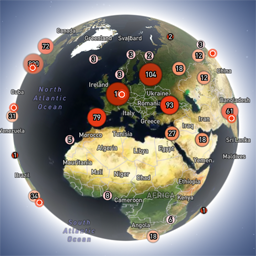
Globe Visitors Counter (Lite) adds a beautiful, fast, iframe-isolated 3D visitor globe to any WordPress site. It instantly shows your audience geography — fully locally, privately, and without any third-party tracking. This Lite version is designed for clarity, speed, and instant visual feedback — especially on landing pages and campaign pages. Use Case: Instant Visual Feedback for Advertising Campaigns The situation You have a product or a service. You launch an advertising campaign: Google Ads Facebook / Instagram TikTok banner ads email campaigns any other traffic source All traffic is sent to one landing page. Usually what comes next is boring: tables, charts, numbers, dashboards, “we’ll analyze it later”. The solution You place Globe Visitors Counter Lite directly on the landing page. No server setup. No external analytics. No configuration. And you start seeing your traffic with your own eyes. How it works (very simple) You launch the ads Visitors arrive at the page Each real visitor appears as a dot on the globe — in real time, from their actual location The globe comes alive and instantly shows: – whether people are coming at all – which countries and regions react – whether the campaign works or misses completely No dots — ads don’t work. Dots appear — ads are alive. Why Lite is perfect for landing pages Lite is not deep analytics. It’s a visual “life indicator”. Perfect when you need: – fast visual feedback – immediate confirmation that traffic is real – zero setup and zero learning curve – a simple “wow effect” for clients, teams, or investors You watch, not analyze. Key Features Interactive 3D Land-Cover globe included out of the box Real-time visitor logging using a tiny local JSON file Historical dots displayed automatically Zero configuration, works with all themes & editors Shortcode-based, easy placement on any page No cookies, no remote APIs, GDPR-friendly Ultra-fast loading thanks to iframe sandboxing How It Works When a page with the shortcode is opened, the plugin loads a fully self-contained viewer from: /wp-content/uploads/visitors-lite-landcover/ Each visit is logged locally as a minimal record (timestamp + coordinates + city + country) into: visitors.json Everything stays on your server. No tracking pixels. No third-party analytics. No cookies. Why Use It Ideal for landing pages and product launches Visualizes global audience instantly Safe for cached pages and CDNs Works even on heavily optimized sites When You May Need the Full Version Lite is intentionally simple and fast. If you need: – long-term statistics – multiple pages or sites – extended visitor history – advanced visual modes and skins – more control and customization …then the Full (Pro) version may be a better fit. Lite remains perfect for single pages, launches, tests, and quick visual validation. Tester Program (optional) We are tuning defaults and performance for upcoming builds. If you want to enable advanced features during testing at no cost (extra visual modes, effects, skins), join via Support: https://wordpress.org/support/topic/looking-for-testers-free-advanced-features-for-feedback/ Usage Shortcode: [visitors_globe_lite title=”VISITORS” width=”100%” height=”600″] Attributes: – title — optional caption above the globe – width — iframe width (100% or fixed px) – height — iframe height in px Place the shortcode anywhere — Classic or Block editor.