GSheetConnector – Elementor Forms Google Sheet Connector to Sync Submissions to Google Sheets
GSheetConnector for Elementor Forms is a powerful Elementor Google Sheets integration plugin that connects Elementor Forms and MetForm directly to Google Sheets. GSheetConnector acts as a secure bridge between your WordPress site, Elementor Pro Forms or MetForm, and Google Sheets — enabling real-time form submission sync and automated spreadsheet management without manual exports. Automatically sync Elementor form submissions to Google Sheets in real-time and eliminate manual exports, CSV downloads, or copy-paste workflows. Every submission is securely transferred to your selected Google Spreadsheet instantly after form submission. Whether you collect leads, contact inquiries, bookings, registrations, or customer data, GSheetConnector ensures reliable Google Sheets sync and structured spreadsheet management directly from your WordPress site. Built specifically for Elementor Pro Forms and MetForm, this plugin delivers seamless Google Sheets integration with secure authentication and automatic data synchronization. Why Choose GSheetConnector? ✔ Sync Elementor Forms to Google Sheets instantly ✔ Direct Google Sheets integration without third-party automation tools like Zapier ✔ Support for Elementor Pro and MetForm ✔ Secure Google OAuth 2.0 authentication ✔ Lightweight, fast, and performance optimized Built specifically for Elementor Pro Forms and MetForm users who need secure, real-time Google Sheets integration and reliable form submission sync. How Elementor to Google Sheets Sync Works When a visitor submits an Elementor Form (Elementor Pro) or MetForm (Free or Pro), GSheetConnector automatically syncs the form submission to Google Sheets in real-time by creating a new row in your connected Google Spreadsheet. All standard and advanced form field types are supported. Submission date is recorded automatically, with extended metadata available in the Pro version. Secure Google OAuth authentication ensures safe data transfer without complex API configuration. Core Features (Free Version) Real-Time Elementor Forms to Google Sheets Sync Automatically sync Elementor Forms and MetForm submissions to Google Sheets in real-time. One-Time Google Authentication Authenticate once and enable continuous automatic form submission sync. Field & Column Mapping Map Elementor form fields directly to Google Sheet columns. Submission Date Capture Automatically record submission date with every form entry. View Connected Google Spreadsheet Access your linked Google Sheet directly from plugin settings. Secure Google OAuth Authentication Includes one-click Google authentication using official Google APIs. Full Compatibility Works with Elementor Pro Forms, MetForm (Free & Pro), latest WordPress versions, and modern PHP environments. 🛠️ How to Send Elementor Forms Entries to Google Sheets After installing and activating GSheetConnector: Step 1: Authenticate with Google Use the one-click Google authentication button to securely connect your WordPress site to your Google Sheets account. Step 2: Configure Sheet Details Enter your Google Sheet Name, Sheet ID, Tab Name, and Tab ID inside plugin settings or within the Elementor Form editor under “Actions After Submit” → select “GSheetConnector”. Step 3: Match Form Fields with Sheet Columns Ensure your Google Spreadsheet has column headers in the first row that match your Elementor form field labels. Save and submit a test form — your data will sync to Google Sheets in real-time. 🚀 Pro Features Upgrade to Elementor Forms Google Sheets Connector PRO for advanced automation and enhanced control. Automatic Header Creation Generate Google Sheet column headers automatically from form fields. Synchronize Existing Entries Sync previously submitted Elementor or MetForm entries. Advanced Field & Column Management Edit, reorder, enable, or disable specific form fields before syncing. Extended Submission Metadata Capture submission time, IP address, browser info, and additional metadata. Freeze Header Rows Freeze header rows in Google Sheets for better readability. Header & Row Styling Customize header colors and alternate row styling. Manual API & Service Account Authentication Supports manual Google API configuration and Service Account authentication. Live Demo & Resources Homepage | Documentation | Support | Demo | Premium Version 🌟 About GSheetConnector Part of the GSheetConnector suite, supporting over 80,000 WordPress users worldwide across multiple Google Sheets integrations. GSheetConnector provides Google Sheets integrations for popular WordPress forms and WooCommerce, helping automate data syncing without writing code. Important Notes Ensure your Google Sheet Name, Sheet ID, Tab Name, Tab ID, and Column Headers match exactly with the values entered in plugin settings. • Use exact form field labels as column headers • Avoid special characters in column names • Keep column headers consistent with form field labels Proper formatting ensures accurate real-time Elementor to Google Sheets synchronization.
Top keywords
- google39×5.74%
- elementor22×3.24%
- google sheets21×3.09%
- sheets21×3.09%
- form18×2.65%
- forms12×1.76%
- pro11×1.62%
- submission11×1.62%
- sync11×1.62%
- gsheetconnector10×1.47%
- authentication9×1.32%
- metform9×1.32%
Input Mask For Elementor Form Fields
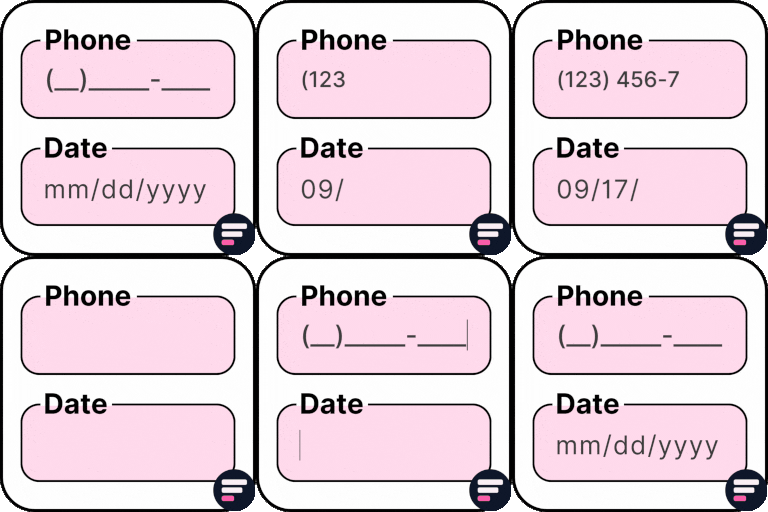
Input Mask For Elementor Form Fields is an Elementor addon that helps to add input masks on Elementor form fields. It helps you control how users enter data into form fields, ensuring properly formatted entries for phone numbers, credit cards, dates, Brazilian IDs, and more. Originally developed by Rodrigo Bogdanowicz, this plugin is now actively maintained and supported by the Cool Plugins team, who continue to add new features, bug fixes, and compatibility updates. This plugin works with Elementor Pro and the Hello Plus form widget. Simply edit your Elementor form, select a text field, and apply the desired mask. 👉 Check Live Demo Need more advanced Elementor form fields? Extend your forms with Cool FormKit (aka coolformkit). With Cool FormKit, you can add: Range Sliders Calculator Fields Signature Fields Rating Fields Conditional Logic Spam protection with hCaptcha and Cloudflare Turnstile Supported Input Masks Phone Masks: Add common phone number formats such as USA, Brazil, and more. 0000-0000 (000) 000-0000 (00) 0000-0000 (00) 0.0000-0000 Credit Card Masks: Format card numbers and expiry dates. Card: 0000-0000-0000-0000 Expiry: 00/00 Date & Time Masks: Keep date and time inputs consistent. Date: 00/00/0000 Time: 00:00:00 Date & Time: 00/00/0000 00:00:00 Currency Masks: Enforce correct money formats. Comma style: 00,000.00 Dot style: 00.000,00 Brazilian Formats (CPF, CNPJ, CEP): Capture accurate Brazilian IDs. CPF: 000.000.000-00 CNPJ: 00.000.000/0000-00 CEP: 00000-000 More Addons for Elementor Forms Conditional Fields for Elementor Form – Add conditional logic to show, hide, enable, or disable fields dynamically. Country Code for Elementor Form Telephone Field – Add a dropdown with country codes and flags for phone fields. Cool FormKit – A complete Elementor form builder addon that extends Pro forms and adds a full widget for Elementor Free. Other Popular Elementor Addons by Cool Plugins Timeline Widget for Elementor – Create stunning vertical and horizontal timelines inside Elementor editor easily. Events Widgets for Elementor – Add The Events Calendar in Elementor pages easily via using these events widgets. AutoPoly – AI Translation for Polylang – Translate Elementor websites automatically via AI and Polylang plugin. Loop Grid Extender for Elementor Pro – Add ACF repeater support and advanced taxonomy filters in Elementor loop builder. LocoAI – Auto Translate for Loco Translate – AI-powered string translation for plugins and themes inside Loco Translate. Use of 3rd Party Services: This plugin connects to the Cool Plugins feedback server only for optional usage data sharing and voluntary feedback submission (for example, during plugin deactivation). Data is transmitted solely after explicit user consent. No hidden tracking is performed, and no frontend visitor or site user data is collected. For more details, please review our Data Usage Policy, TOS, and Privacy Policy. Disclaimer: This plugin is not affiliated with or endorsed by the official Elementor team. Some links provided may be affiliate links, which means we could earn a small commission at no additional cost to you if you make a purchase. 👉 Get Cool FormKit – Advanced Elementor Form Builder