Fathom Analytics for WP
The best Google Analytics alternative for WordPress Fathom Analytics is a simple-to-use, privacy-focused (GDPR-compliant) website analytics tool for your WordPress site. You don’t have to edit the code in your WordPress template to start using our software. 👉 Check out our live demo or sign up for a free 30-day trial. You’ll need a subscription to Fathom Analytics to start collecting stats with this plugin, and our pricing starts at just $14/month. Instead of generating revenue from your visitors’ data, we charge a fair and sustainable price for all our plans. Our business model is privacy-first by design. Why use Fathom Analytics? Google Analytics is time-consuming to use and difficult to understand. Google also kills off its popular software far too often (like Universal Analytics). That’s why Fathom Analytics exists: to make website analytics easy and quick to understand. Thousands of customers, from governments and banks to small businesses and bloggers, trust their website analytics to Fathom. Import from Google Analytics We’ve got an importer to save your UA (Universal Analytics) and GA4 data. Because we’ve got unlimited data retention, you can keep and view your stats forever. Setup in minutes Because Fathom Analytics is a single line of code, and our WordPress plugin doesn’t even require any coding, you can go from starting a trial to seeing real-time data within a few minutes. Learn how to set up our plugin here. Comply with privacy laws The best lawyers and legal minds worldwide regarding digital privacy have ensured that Fathom Analytics is fully compliant with GDPR, CCPA, ePrivacy, PECR and more. No cookie banners are required We invented the now industry-standard method for anonymizing visitor data without using cookies. That means you don’t have to clutter your site or slow it down with cookie banner plugins or consent notices for your site’s analytics. Email reports Get a snapshot of your website or websites delivered to your inbox so you can see your critical stats without even having to log into Fathom Analytics. These reports can be set up for any dashboard (or all of them) and sent to anyone (at your company, to your clients, whomever you want). Shared or private dashboards Want to grant access to specific website dashboards for particular clients/employees? Or make your dashboard 100% public? Fathom Analytics lets you create private, public or passworded dashboards without needing an account. More features Simple options page within WordPress admin Ability to not track yourself or specific user roles with a single click Search within dashboard boxes Tiny, lightweight script that’s great for your SEO Dark mode All sites view to see all your sites at a glance And much more Setup this WordPress plugin To learn how to quickly setup this plugin, read our support doc.
Top keywords
- analytics17×3.63%
- fathom9×1.92%
- fathom analytics8×1.71%
- wordpress6×1.28%
- data5×1.07%
- website5×1.07%
- google4×0.85%
- dashboard3×0.64%
- dashboards3×0.64%
- google analytics3×0.64%
- setup3×0.64%
- site3×0.64%
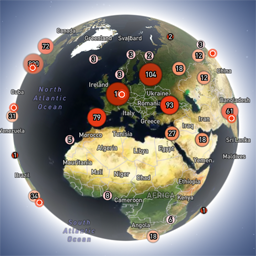
Globe Visitors Counter
Globe Visitors Counter (Lite) adds a beautiful, fast, iframe-isolated 3D visitor globe to any WordPress site. It instantly shows your audience geography — fully locally, privately, and without any third-party tracking. This Lite version is designed for clarity, speed, and instant visual feedback — especially on landing pages and campaign pages. Use Case: Instant Visual Feedback for Advertising Campaigns The situation You have a product or a service. You launch an advertising campaign: Google Ads Facebook / Instagram TikTok banner ads email campaigns any other traffic source All traffic is sent to one landing page. Usually what comes next is boring: tables, charts, numbers, dashboards, “we’ll analyze it later”. The solution You place Globe Visitors Counter Lite directly on the landing page. No server setup. No external analytics. No configuration. And you start seeing your traffic with your own eyes. How it works (very simple) You launch the ads Visitors arrive at the page Each real visitor appears as a dot on the globe — in real time, from their actual location The globe comes alive and instantly shows: – whether people are coming at all – which countries and regions react – whether the campaign works or misses completely No dots — ads don’t work. Dots appear — ads are alive. Why Lite is perfect for landing pages Lite is not deep analytics. It’s a visual “life indicator”. Perfect when you need: – fast visual feedback – immediate confirmation that traffic is real – zero setup and zero learning curve – a simple “wow effect” for clients, teams, or investors You watch, not analyze. Key Features Interactive 3D Land-Cover globe included out of the box Real-time visitor logging using a tiny local JSON file Historical dots displayed automatically Zero configuration, works with all themes & editors Shortcode-based, easy placement on any page No cookies, no remote APIs, GDPR-friendly Ultra-fast loading thanks to iframe sandboxing How It Works When a page with the shortcode is opened, the plugin loads a fully self-contained viewer from: /wp-content/uploads/visitors-lite-landcover/ Each visit is logged locally as a minimal record (timestamp + coordinates + city + country) into: visitors.json Everything stays on your server. No tracking pixels. No third-party analytics. No cookies. Why Use It Ideal for landing pages and product launches Visualizes global audience instantly Safe for cached pages and CDNs Works even on heavily optimized sites When You May Need the Full Version Lite is intentionally simple and fast. If you need: – long-term statistics – multiple pages or sites – extended visitor history – advanced visual modes and skins – more control and customization …then the Full (Pro) version may be a better fit. Lite remains perfect for single pages, launches, tests, and quick visual validation. Tester Program (optional) We are tuning defaults and performance for upcoming builds. If you want to enable advanced features during testing at no cost (extra visual modes, effects, skins), join via Support: https://wordpress.org/support/topic/looking-for-testers-free-advanced-features-for-feedback/ Usage Shortcode: [visitors_globe_lite title=”VISITORS” width=”100%” height=”600″] Attributes: – title — optional caption above the globe – width — iframe width (100% or fixed px) – height — iframe height in px Place the shortcode anywhere — Classic or Block editor.