Fathom Analytics Conversions
This Fathom Analytics partner plugin makes it easy to enable WordPress forms and pages as Fathom Analytics Events with no code. 👉 Go to the official Fathom Analytics plugin What does this companion plugin do? Makes it easy to track user actions such as form submissions and landing page visits as events in your Fathom Analytics account. Best of all no technical knowledge is required to implement events on your site. Key Features No code event tracking for marketers and website owners Common form plugins supported Make any page or post an Event Synchronized event names between website and analytics Watch the setup walkthrough This is not an official Fathom plugin This WordPress plugin “Fathom Conversions” is not part of, or associated with “Fathom Analytics” by Conva Ventures Inc. ⚠️ Warning BETA API in use This plugin uses the Beta Fathom Analytics API, which is still in early access, and subject to changes in the future, this plugin could stop working without warning if updates occur. Privacy Notices This plugin: does not track any users stores plugin settings and event mappings in the WordPress database sends data to the Fathom Analytics servers – more information can be found on Fathom Analytics website Demo You can find more information about the plugin, and see a demo and installation instructions on the Fathom Conversions website Requirements For this to work you will need a paid Fathom Analytics account (get $10 off your first month with this link) And a supported WordPress plugin listed below installed and active. Currently supported plugins Contact Form 7 WPForms & WPForms Pro Gravity Forms Ninja Forms & Ninja Forms Pro Fluent Forms & Fluent Forms Pro WooCommmerce For Developers Fathom Analytics Conversions provides hooks and helper functions so that plugin and theme developers can fire Fathom conversion events from their own code. Quick Start The simplest way to fire a conversion from your plugin: // Fire a basic conversion event. add_action( 'wp_footer', function() { do_action( 'fac_track_event', 'My Custom Conversion' ); }); // Fire a conversion with a monetary value (in cents, e.g. 1999 = $19.99). add_action( 'wp_footer', function() { do_action( 'fac_track_event', 'Premium Signup', 4999 ); }); The event name you pass here will appear in your Fathom Analytics dashboard. If the event doesn’t exist yet, Fathom will create it automatically on the first fire. PHP Helper Function You can also call the helper function directly: /** * fac_track_conversion( string $event_name, int $value = 0 ) * * Outputs a fathom.trackEvent() script tag on the frontend. * Must be called during or before wp_footer output. * * @param string $event_name Event name (shown in Fathom dashboard). * @param int $value Optional. Value in cents. Default 0. */ add_action( 'wp_footer', function() { if ( function_exists( 'fac_track_conversion' ) ) { fac_track_conversion( 'Booking Confirmed', 15000 ); } }); Both methods automatically check that Fathom Analytics is active and respect excluded user roles — you don’t need to add those checks yourself. Available Filters You can customize event names for built-in integrations using these filters: fac_woocommerce_order_title — Customize the WooCommerce order event name. Default: “WooCommerce Order”. fac_login_event_title — Customize the login event name. Default: “WP Login”. fac_registration_event_title — Customize the registration event name. Default: “WP Registration”. fac_lost_password_event_title — Customize the lost password event name. Default: “WP Lost Password”. Example: add_filter( 'fac_woocommerce_order_title', function( $title ) { return 'Shop Purchase'; }); Adding a Custom Integration to the Settings Page Use these filters and actions to add your own integration checkbox to the plugin’s settings page: // 1. Add a default option. add_filter( 'fac4wp_global_default_options', function( $defaults ) { $defaults['integrate-my-plugin'] = false; return $defaults; }); // 2. Add a checkbox to the Integration section. add_filter( 'fac4wp_integrate_field_texts', function( $fields ) { $fields['integrate-my-plugin'] = [ 'label' => 'My Plugin', 'description' => 'Track conversions from My Plugin.', 'phase' => 'fac4wp-phase-stable', 'plugin_to_check' => 'my-plugin/my-plugin.php', ]; return $fields; }); // 3. Fire the conversion when your plugin's action completes. add_action( 'wp_footer', function() { $options = get_option( 'fac4wp-options', [] ); if ( ! empty( $options['integrate-my-plugin'] ) && my_plugin_conversion_happened() ) { do_action( 'fac_track_event', 'My Plugin Conversion' ); } }); JavaScript API If you need to fire a Fathom event directly from JavaScript (e.g., after an AJAX action), you can call the Fathom tracking function directly. The Fathom Analytics script exposes a global fathom object: // Basic event fathom.trackEvent('My JS Event'); // Event with monetary value (in cents) fathom.trackEvent('My JS Event', { _value: 1999 }); Note: The fathom object is only available on the frontend when the Fathom Analytics plugin is active and the tracking script has loaded. Utility Functions These functions are available for checking the plugin state: is_fac_fathom_analytic_active() — Returns true if Fathom Analytics tracking is active. fac_fathom_is_excluded_from_tracking() — Returns true if the current user’s role is excluded. FAC_Options::get( $key ) — Retrieve a specific plugin option value.
Top keywords
- fathom30×3.74%
- event21×2.62%
- analytics16×1.99%
- fathom analytics15×1.87%
- add11×1.37%
- function11×1.37%
- action9×1.12%
- fac9×1.12%
- conversion8×1.00%
- event name8×1.00%
- name8×1.00%
- track8×1.00%
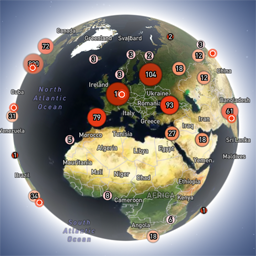
Globe Visitors Counter
Globe Visitors Counter (Lite) adds a beautiful, fast, iframe-isolated 3D visitor globe to any WordPress site. It instantly shows your audience geography — fully locally, privately, and without any third-party tracking. This Lite version is designed for clarity, speed, and instant visual feedback — especially on landing pages and campaign pages. Use Case: Instant Visual Feedback for Advertising Campaigns The situation You have a product or a service. You launch an advertising campaign: Google Ads Facebook / Instagram TikTok banner ads email campaigns any other traffic source All traffic is sent to one landing page. Usually what comes next is boring: tables, charts, numbers, dashboards, “we’ll analyze it later”. The solution You place Globe Visitors Counter Lite directly on the landing page. No server setup. No external analytics. No configuration. And you start seeing your traffic with your own eyes. How it works (very simple) You launch the ads Visitors arrive at the page Each real visitor appears as a dot on the globe — in real time, from their actual location The globe comes alive and instantly shows: – whether people are coming at all – which countries and regions react – whether the campaign works or misses completely No dots — ads don’t work. Dots appear — ads are alive. Why Lite is perfect for landing pages Lite is not deep analytics. It’s a visual “life indicator”. Perfect when you need: – fast visual feedback – immediate confirmation that traffic is real – zero setup and zero learning curve – a simple “wow effect” for clients, teams, or investors You watch, not analyze. Key Features Interactive 3D Land-Cover globe included out of the box Real-time visitor logging using a tiny local JSON file Historical dots displayed automatically Zero configuration, works with all themes & editors Shortcode-based, easy placement on any page No cookies, no remote APIs, GDPR-friendly Ultra-fast loading thanks to iframe sandboxing How It Works When a page with the shortcode is opened, the plugin loads a fully self-contained viewer from: /wp-content/uploads/visitors-lite-landcover/ Each visit is logged locally as a minimal record (timestamp + coordinates + city + country) into: visitors.json Everything stays on your server. No tracking pixels. No third-party analytics. No cookies. Why Use It Ideal for landing pages and product launches Visualizes global audience instantly Safe for cached pages and CDNs Works even on heavily optimized sites When You May Need the Full Version Lite is intentionally simple and fast. If you need: – long-term statistics – multiple pages or sites – extended visitor history – advanced visual modes and skins – more control and customization …then the Full (Pro) version may be a better fit. Lite remains perfect for single pages, launches, tests, and quick visual validation. Tester Program (optional) We are tuning defaults and performance for upcoming builds. If you want to enable advanced features during testing at no cost (extra visual modes, effects, skins), join via Support: https://wordpress.org/support/topic/looking-for-testers-free-advanced-features-for-feedback/ Usage Shortcode: [visitors_globe_lite title=”VISITORS” width=”100%” height=”600″] Attributes: – title — optional caption above the globe – width — iframe width (100% or fixed px) – height — iframe height in px Place the shortcode anywhere — Classic or Block editor.