Epic Tracking – Click & Event Tracking for WordPress
Epic Tracking lets you add event tracking to any element on your WordPress site using a visual editor. Click the element you want to track, give it a name, and you’re done — events start recording immediately. No code, no Google Tag Manager, no external scripts. Visual Click & Event Editor Open the visual editor on any page from the WordPress admin bar. Click a button, link, form, CTA, or any other element — give it a reference name and tag — and save. That’s it. The event is live and tracking starts immediately. Track button clicks, form submissions, link clicks, and CTA conversions Set up events in seconds with a point-and-click interface Organize events with custom tags for easy filtering No coding or tag manager knowledge required Built-in Analytics Dashboard The plugin includes a full analytics dashboard in your WordPress admin: Event trigger counts with unique visitor breakdowns Page view statistics with date range filtering Per-page detail views with referrer, device, browser, OS, and country data Daily traffic charts and trend visualization Sortable tables with pagination Self-Hosted & Privacy-Friendly All tracking data stays in your WordPress database. No data is sent to third-party analytics services. Visitors are identified using a single first-party cookie — no personal data is stored or shared. Features Visual event editor — Point-and-click setup for tracking clicks on any element Custom event tags — Organize events with tags for easy filtering and reporting Event analytics — See which events fire most, with trigger counts and unique visitors Page view tracking — Automatic visit logging with full referrer and device data Country geolocation — Automatic IP-based country detection for visitor locations Bot filtering — Known bots and crawlers are automatically excluded Role exclusion — Exclude administrators or any user role from being tracked Date range filtering — Quick presets (today, last 7 days, last 30 days) and custom ranges Lightweight — No impact on page load speed; tracking runs asynchronously after render Self-hosted — All data stored in your WordPress database, no external dependencies Clean uninstall — All tables and options are removed when you delete the plugin Use Cases Track which CTAs and buttons get the most clicks on your landing pages Measure form submission rates and conversion events without tag managers Monitor page views and traffic trends without Google Analytics See which referrers drive the most traffic to specific pages Understand visitor demographics: device type, browser, OS, and country Why Epic Tracking? Most WordPress event tracking requires Google Tag Manager, custom JavaScript, or expensive third-party services. Epic Tracking gives you a visual editor to set up event tracking in seconds — no code, no external scripts, no data leaving your server. External services This plugin uses the ip-api.com geolocation service to determine visitor country based on their IP address. An HTTP request is sent to ip-api.com each time a new visitor is recorded (unless a cached result is available). The request contains only the visitor’s IP address. No other personal data is sent. Service: ip-api.com Data sent: visitor IP address When: on each new visit (results are cached for 24 hours) Terms of service: ip-api.com/docs/legal Privacy policy: ip-api.com/docs/legal
Top keywords
- tracking11×2.12%
- data9×1.74%
- event9×1.74%
- visitor7×1.35%
- events6×1.16%
- wordpress6×1.16%
- analytics5×0.97%
- com5×0.97%
- country5×0.97%
- editor5×0.97%
- filtering5×0.97%
- ip-api5×0.97%
Globe Visitors Counter
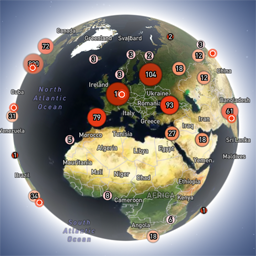
Globe Visitors Counter (Lite) adds a beautiful, fast, iframe-isolated 3D visitor globe to any WordPress site. It instantly shows your audience geography — fully locally, privately, and without any third-party tracking. This Lite version is designed for clarity, speed, and instant visual feedback — especially on landing pages and campaign pages. Use Case: Instant Visual Feedback for Advertising Campaigns The situation You have a product or a service. You launch an advertising campaign: Google Ads Facebook / Instagram TikTok banner ads email campaigns any other traffic source All traffic is sent to one landing page. Usually what comes next is boring: tables, charts, numbers, dashboards, “we’ll analyze it later”. The solution You place Globe Visitors Counter Lite directly on the landing page. No server setup. No external analytics. No configuration. And you start seeing your traffic with your own eyes. How it works (very simple) You launch the ads Visitors arrive at the page Each real visitor appears as a dot on the globe — in real time, from their actual location The globe comes alive and instantly shows: – whether people are coming at all – which countries and regions react – whether the campaign works or misses completely No dots — ads don’t work. Dots appear — ads are alive. Why Lite is perfect for landing pages Lite is not deep analytics. It’s a visual “life indicator”. Perfect when you need: – fast visual feedback – immediate confirmation that traffic is real – zero setup and zero learning curve – a simple “wow effect” for clients, teams, or investors You watch, not analyze. Key Features Interactive 3D Land-Cover globe included out of the box Real-time visitor logging using a tiny local JSON file Historical dots displayed automatically Zero configuration, works with all themes & editors Shortcode-based, easy placement on any page No cookies, no remote APIs, GDPR-friendly Ultra-fast loading thanks to iframe sandboxing How It Works When a page with the shortcode is opened, the plugin loads a fully self-contained viewer from: /wp-content/uploads/visitors-lite-landcover/ Each visit is logged locally as a minimal record (timestamp + coordinates + city + country) into: visitors.json Everything stays on your server. No tracking pixels. No third-party analytics. No cookies. Why Use It Ideal for landing pages and product launches Visualizes global audience instantly Safe for cached pages and CDNs Works even on heavily optimized sites When You May Need the Full Version Lite is intentionally simple and fast. If you need: – long-term statistics – multiple pages or sites – extended visitor history – advanced visual modes and skins – more control and customization …then the Full (Pro) version may be a better fit. Lite remains perfect for single pages, launches, tests, and quick visual validation. Tester Program (optional) We are tuning defaults and performance for upcoming builds. If you want to enable advanced features during testing at no cost (extra visual modes, effects, skins), join via Support: https://wordpress.org/support/topic/looking-for-testers-free-advanced-features-for-feedback/ Usage Shortcode: [visitors_globe_lite title=”VISITORS” width=”100%” height=”600″] Attributes: – title — optional caption above the globe – width — iframe width (100% or fixed px) – height — iframe height in px Place the shortcode anywhere — Classic or Block editor.