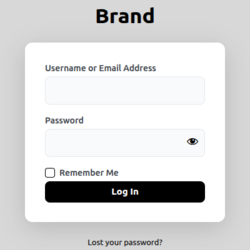
DC Login Designer
DC Login Designer transforms your WordPress login page with professional design and zero bloat. Key Features Your Brand Color – Pick any color with automatic shade generation 22+ Tailwind Color Presets – Ready-made professional color schemes Logo & Branding – Custom logo or text with full control Background Images – Upload custom backgrounds Pure CSS – Zero JavaScript on frontend, blazing fast performance Lightweight – Single file plugin, minimal database footprint Auto Color Sync – Text colors automatically match your scheme Non-clickable Elements – No unwanted links on login page Perfect For Agencies branding client sites Businesses matching company colors Designers wanting quick customization Anyone who wants a professional login page in 60 seconds Why Choose DC Login Designer? ✓ Custom color picker with automatic shade generation ✓ 22 beautiful Tailwind CSS color presets ✓ Non-clickable logos and text (no unwanted links) ✓ Real-time color synchronization ✓ Responsive design on all devices ✓ WordPress coding standards compliant ✓ No external dependencies ✓ Settings link in plugins list for quick access Available Color Presets Red, Orange, Amber, Yellow, Lime, Green, Emerald, Teal, Cyan, Sky, Blue, Indigo, Violet, Purple, Fuchsia, Pink, Rose, Slate, Gray, Zinc, Neutral, Stone Technical Excellence Pure CSS implementation (zero JavaScript on frontend) Single database option for all settings WordPress Media Uploader integration Automatic color shade generation Clean, documented code GPL v2 licensed Additional Info Author: Dheeraj Codex Author URI: https://dheerajcodex.github.io/ Support For support, feature requests, or bug reports, please use the WordPress.org support forums. Contribute Developers can contribute to the source code on GitHub or through the WordPress.org plugin repository. Privacy Policy DC Login Designer does not collect, store, or transmit any user data. All settings are stored locally in your WordPress database.
Custom Login Page Customizer
The Custom Login Page Customizer is an excellent solution for your WordPress website if you want to customize the login page to match your website’s branding. By customizing the login page, you can provide your users with a better experience, improve the security of your website, and make your website look more professional and trustworthy. With Custom Login Page Customizer, you can change the login page’s background, colors, and fonts and add custom logos or images. Moreover, login Customizer allows you to create a login page that matches your website’s design, making it more visually appealing and professional-looking. Why Use Login Customizer? The Login Customizer plugin is an excellent solution for WordPress website owners who want to customize the login page to match their website’s branding. Here are some of the benefits of using Login Customizer: Customization options: The plugin offers a wide range of customization options that allow you to change the login page’s appearance to match your website’s branding. You can customize the logo, background image, color scheme, font size, and more. User experience: By customizing the login page, you can give your users a better experience. A branded login page makes your website look more professional and trustworthy, which can help increase user engagement and loyalty. Features of Login Customizer The Login Customizer plugin has many features that allow you to customize the login page to match your website’s branding. Here are some of the key features: User-Friendly Interface: LoginCustomizer has a user-friendly interface that makes it easy for both beginner and advanced developers. You don’t need coding or technical knowledge to customize your login page and form. Easy Customization: Custom Login Page Customizer allows you to customize every aspect of your login page, including the logo, background color, text color, font size, button style, and many more. You can also add custom CSS code to enhance the customization further. Live Preview: With the live preview feature, you can see your changes to your login page and form in real time. It lets you make quick and easy adjustments until you achieve the desired look and feel. Responsive Design: The plugin is fully responsive, which means your custom login page and form will look great on all devices, including desktops, laptops, tablets, and smartphones. Multisite Support: Custom Login Page Customizer is compatible with WordPress multisite. You can customize the login page and form for all sites in your network from a single location. Custom Logo: You can upload your logo to the login page and adjust its size and position. Background Image: You can add a background image to the login page, a static image, or a slideshow. Color Scheme: You can choose from various color schemes or create your custom color scheme. Font Size: You can adjust the font size for the login form, links, and other elements on the login page. Custom CSS: You can add your own CSS to customize the login page further.