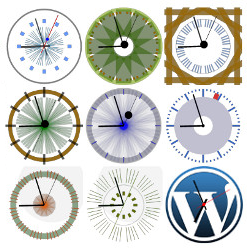
CoolClock
This plugin integrates CoolClock – The Javascript Analog Clock into your WordPress site. You can add it as a widget to your sidebar or insert it into your posts and pages with a shortcode. See the FAQ’s for available shortcode parameters and how to build the clock into your theme. Features Can be added via a widget, shortcode or theme function No flash, meaning compatible with tablets and most other javascript enabled mobile devices 22 different skins to choose from or Custom skin option to create your own skin style Linear or logarithmic time scale Read more on the CoolClock homepage or see the FAQ’s to learn how to configure your own skin settings. Pro features Show date or 24h digital time Background image or color Border radius (rounded corners for background) Advanced positioning options (relative to background) Advanced shortcode parameters (including background image and custom skin) One extra clean skin for use with background image Support on the CoolClock Pro forum Pro features come with the CoolClock – Advanced extension. Translators Dutch * R.A. van Hagen https://status301.net/ (version 3.0) French * R.A. van Hagen https://status301.net/ (version 3.0) German * Manfred Mrak http://www.niftyfox.ch/ (version 3.2) Serbian * Borisa Djuraskovic – WebHostingHub http://www.webhostinghub.com/ (version 2.9.4) Slovenian * Adijan Dervišević – http://www.adijan.eu (version 3.2) Russian * Наталия Завьялова – http://time-impressions.ru (version 2.9.8) Please contact me to submit your translation and get mentioned here 🙂 Privacy / GDPR This plugin does not collect any user or visitor data nor set browser cookies. Using this plugin should not impact your site privacy policy in any way. Known Issues When IE 8 is manually put or forced (through X-UA-Compatibility meta tag or response header) into Compatibility mode, the Clock will –even though the canvas area is put in place– remain invisible. When a shortcode is not placed on its own line but on the same line with text, image or even another shortcode, then the output (div with canvas tag) will be wrapped inside a paragraph tag. While most browsers do not have a problem displaying the clock, this will cause a validation error. Please report any other issues on the Support page.
Top keywords
- shortcode6×1.62%
- version6×1.62%
- background5×1.35%
- skin5×1.35%
- clock4×1.08%
- coolclock4×1.08%
- http4×1.08%
- image4×1.08%
- advanced3×0.81%
- background image3×0.81%
- http www3×0.81%
- own3×0.81%
Social Media Share Buttons & Social Sharing Icons
Try it out on your free dummy site: Click here => https://tastewp.com/plugins/ultimate-social-media-icons (this trick works for all plugins – just replace “wordpress” with “tastewp” in the plugin’s WP repo URL) Social media plugin which let’s you add share icons for RSS, Email, Facebook, Twitter, LinkedIn, Pinterest, Instagram, Youtube, ‘Share’ (covering 200+ other social media platforms) and upload custom share icons of your choice. This free plugin has a lot to offer. Even more can be found in the Premium Plugin, please watch this short video: See all features of the Premium plugin. The free social media plugin includes the following features: Pick from 16 different designs for your social media share icons Give several actions to one social media share icon (e.g. your facebook share icon can lead visitors to your Facebook page, and also give visitors the opportunity to like your page) Decide to give your social media icons an animation (e.g. automatic shuffling, mouse-over effects) to make your visitors aware of the share icons, increasing the chance that they follow/share your blog Make your social media icons ‘float’ or ‘sticky’ Allow visitors to subscribe to your blog by Email Add ‘counts’ to your social media buttons Decide to display a pop-up (on all or only on selected pages) asking people to follow/share you via your social media icons Decide to display sharing-buttons and social media icons at the end of every post Select from many other customization features for your socialmedia icons! For GDPR compliance, please have a look at our Social Media GDPR Compliance page. The social media plugin is very easy to use as it takes you through all the steps: Step 1: Choose which social media icons you want to display Step 2: Define what actions your social media icons should perform Step 3: Pick design & animation options for your social media icons Step 4: Add counts to your social media icons (optional) Step 5: Select from various other social share options, e.g. make your social media icons ‘float’ Step 6: Add sharing/linking icons next to each blog post (optional) Step 7: Add a customized pop-up asking people to follow or share (optional) Step 8: Add a subscription form on your site (optional) In case of issues or questions please ask in the Support forum. We hope you enjoy the free social media plugin! New premium social share plugin We released a premium social share plugin with many more exciting features: Many more social networks supported, including Snapchat share buttons, Whatsapp share buttons, Yummly share buttons, Phone button, Yelp share buttons, Soundcloud share buttons, Skype share buttons Flickr share buttons, Blogger share buttons, Reddit share buttons, Vimeo share buttons, Tumblr share buttons, Xing share buttons, Xhenta, Vkontakte share buttons (VK), Telegram share buttons, Amazon share buttons, Goodreads share buttons, Angies list share buttons, Steam share buttons, Twitch share buttons, Spotify share buttons, Odnoklassniki share buttons (OK), Buffer share buttons, Weibo share buttons, Pocket share buttons, Meneame share buttons, Frype share buttons, LiveJournal share buttons, Patreon share buttons, Dloky share buttons, Discord share buttons, Github share buttons, WordPress buttons, Etsy share buttons, Better Business Bureau share buttons, Digg share buttons, Delicious share buttons, Print share buttons, and many other share buttons! More design styles to make your social share icons look really cool & matching the design of your website Themed design styles, e.g. if you have a website about cats you can pick from social media logos which look like cats etc. Better social sharing and following features, e.g. you can define the Tweet-texts better (e.g. pull the post titles into your Tweets automatically), let people follow you on Facebook directly without leaving your site etc. Place the social icons on specific pages, i.e. you can define on which pages the icons to the social media sites should not show Position the social icons by anchor and margins, i.e. you can define the margins where your share icons should be displayed (from top/bottom/left/right), and then have them floating, or stick, still visible when user scrolls down or not etc. Optimized for mobile – you can define separate selections for your social network icons for mobile More functions for email icon, such as Share (by email), Contact you, Link to a certain page etc. Social media counters optimized to encourage more social media sharing from your visitors More pop up options which contain your social media buttons, e.g. define a limit to how often the pop-up is shown to the same user, show pop-up only when people try to leave your website etc. Friendly support in case you’re stuck Many more settings and options for your social media network icons Have a look at the Premium Plugin features