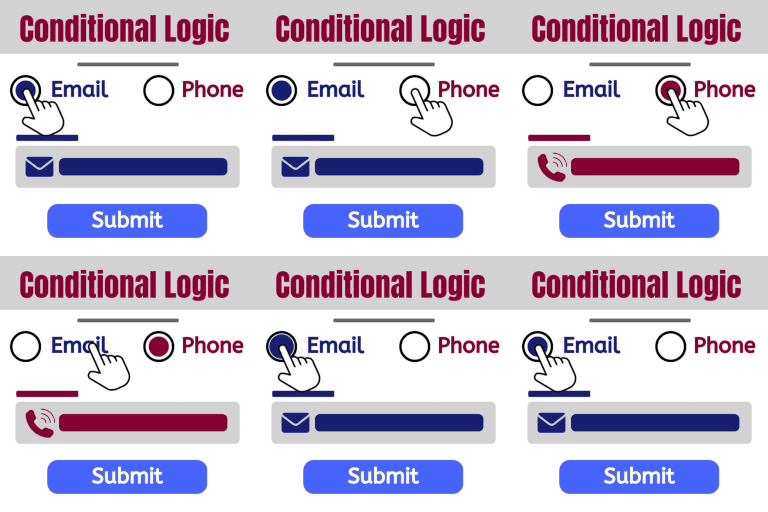
Conditional Logic
Build dynamic forms that can change as a user fills out the form. Show and hide fields. Send certain email, don’t send others. Redirect to one of many pages. The possibilities are endless! DEMO: https://demo.add-ons.org/demo-conditional-logic/ Document: https://add-ons.org/document-elementor-forms-conditional-logic/ Download Pro Version: https://add-ons.org/plugin/elementor-forms-conditional-logic/ Features Easy use Conditional Form Notification Emails: Sending emails to different addresses according to user answers Conditional Redirect on Form Submit: Showing additional questions when a user chooses a specific answer Conditional Webhook on Form Submit: Send data to specific webhook URLs only when certain conditions are met. All fields support: Works with all fields Submit Button support: The submit button can be shown or hidden Multiple Conditions: Define more than one condition for advanced control. No Validation Errors: Submit the form seamlessly even when required fields are hidden. Smart Field Control: Make your forms smart! Display or hide fields, sections, or entire questions based on user responses. No Technical Hassle: Enjoy the benefits of conditional logic without any technical headaches. It’s as simple as it sounds. Cross-browser support. Chrome, Firefox, Opera, IE8+ And more… Conditional Form Notification Emails – Conditional Email Routing Want to send out different notification emails depending on users’ selections in your forms? With our smart conditional logic, you can set up your form to send unique email notifications based on users’ input. Conditional Redirect on Form Submit Want to show website visitors different content based on their form submission? This guide will show you how to set up WordPress conditional redirect on form submit. Webhook Condition Logic Smart Conditional Webhooks – Send data to specific webhook URLs only when certain conditions are met. Dynamic Automation – Easily automate integrations with external systems (like Zapier, Make, or custom APIs) based on user input or form logic. Granular Control – Define “If/Then” rules per form field (for example: If user selects ‘VIP’, send data to CRM webhook). No Code Required – Configure conditional rules directly inside Elementor Forms without writing any PHP. Supports Multiple Webhooks – Trigger different endpoints simultaneously, depending on user selections or calculated values. Upgrade to pro version Additional operators ( greater than, less than, .. ) onditional Form Notification Emails > 5 Conditional Redirect Suports > 5 Conditional Webhook Suports > 1 Conditional Fields for Elementor Form – Display Conditions Elementor conditional fields, Elementor form display conditions, Elementor show hide fields, Elementor conditional logic, Elementor dynamic fields, Elementor form visibility, Elementor form conditions, Elementor conditional form, Elementor hide field on condition, Elementor field rules, Elementor logic form, Elementor smart form, Elementor conditional input, Elementor advanced form logic, Elementor form field toggle
Content Visibility for Divi Builder
Content Visibility for Divi Builder allows Sections and Modules to be displayed/hidden based on the outcome of a PHP boolean expression. This plugin is for both the standalone Divi theme (or child themes thereof) and the Divi Builder plugin, version 3 or higher! Developer Filters Expression Validation Filters The following filters allow developers to customize expression validation behavior. Add these filters in your theme’s functions.php or in a custom plugin. content_visibility_for_divi_builder_blocked_functions Filter the array of blocked function names. Functions in this list will cause an expression to fail validation. All comparisons are case-insensitive. Example – allow file_get_contents (blocked by default): add_filter( 'content_visibility_for_divi_builder_blocked_functions', function( $functions ) { return array_diff( $functions, array( 'file_get_contents' ) ); } ); Example – block an additional function: add_filter( 'content_visibility_for_divi_builder_blocked_functions', function( $functions ) { $functions[] = 'my_dangerous_function'; return $functions; } ); content_visibility_for_divi_builder_allowed_tokens Filter the array of allowed PHP token types (T_* constants). Tokens not in this list will cause an expression to fail validation. This is an advanced filter – consult the PHP tokenizer documentation before modifying. Example – allow the T_VARIABLE token type (blocked by default, use with caution): add_filter( 'content_visibility_for_divi_builder_allowed_tokens', function( $tokens ) { $tokens[] = T_VARIABLE; return $tokens; } ); content_visibility_for_divi_builder_allowed_chars Filter the array of allowed single-character tokens. Characters not in this list (such as =, ;, {, }, `, @, &, |, ~, ^) will cause an expression to fail validation. Example – allow the & character for bitwise operations: add_filter( 'content_visibility_for_divi_builder_allowed_chars', function( $chars ) { $chars[] = '&'; return $chars; } ); content_visibility_for_divi_builder_allowed_callables Filter the array of callables (function names and Class::method static-method entries) the validator considers known-safe. Anything not on the allowlist (and not on the blocked_functions denylist) is treated as an “Unknown callable” error. Names are normalized (leading \ stripped, namespace\ keyword prefix stripped, lowercased) before comparison, so \My\Namespace\Class::method, My\Namespace\Class::method, and namespace\My\Namespace\Class::method all match the same allowlist entry. The default list ships with WordPress conditional tags (is_user_logged_in, current_user_can, is_admin, etc.). The Expression Validation tab’s content scanner generates a ready-to-paste snippet for this filter pre-populated with every custom callable currently in your content. Example – allowlist a theme helper and a static service method: add_filter( 'content_visibility_for_divi_builder_allowed_callables', function( $callables ) { $callables[] = 'mytheme_should_be_visible'; $callables[] = 'MyTheme\Visibility\Service::checkUser'; return $callables; } );