Website Builder by SeedProd
SeedProd – Drag & Drop WordPress Website Builder, Landing Page Builder, Coming Soon Page & Maintenance Mode SeedProd was originally created in 2011 and allowed you to create a Coming Soon Page or a Maintenance Mode Page. You could work on your website in private while visitors see a “Coming Soon” or “Maintenance Mode” page. It still does this and really well! But People loved SeedProd’s easy-to-use page builder so much and wanted to create their entire website with it. So, due to popular demand, you can do just that! Yes, you can now use SeedProd as a WordPress Website Builder. This means you can build every part of your WordPress custom theme. WordPress Headers, Footers, Single Page Templates, Archives, Global Parts, WooCommerce Product Pages, WooCommerce Carts, and more. The best part is SeedProd is a No-Code Website Builder. No coding knowledge or experience is needed. Full Site Editing made easy. In addition, SeedProd is still the best Landing Page Builder. Create a variety of landing pages that include but are not limited to: Sales Pages, Coming Soon Pages, Maintenance Mode Pages, 404 Pages, Login Pages, Webinar Pages, and Thank You Pages. Sites and Pages built with SeedProd’s Drag and Drop Page builder are lightweight, super fast, and it’s so easy to use anyone can create a WordPress Website or Landing Page. SeedProd Pro This plugin is the lite version of the SeedProd Website Builder and Landing Page plugin that comes with all the features you will ever need to create great-looking landing pages, coming soon pages, and maintenance modes pages within your WordPress website with no code. Click here to purchase SeedProd, the best premium WordPress Website Builder and Landing Page plugin now! Watch John Turner, the Co-Founder of SeedProd, build the SeedProd.com website with the SeedProd WordPress Website Builder Using SeedProd as a WordPress Website Builder SeedProd is a WordPress Website Theme Builder, which allows you to create custom theme and template parts like: Headers, Footers, Front Pages, Content Pages, Blog Posts, Blog Pages, Archives, Search Results, Category Pages, Tag Pages, Sidebars, WooCommerce Product Pages. WooCommerce Checkout Pages, WooCommerce Cart Pages, WooCommerce Shop Pages all using our no-code Theme Builder. Typically you would need a traditional WordPress theme to accomplish this. With SeedProd no theme is needed. No more conflicts between your theme and page builder. SeedProd is a complete turnkey solution that gets you a website fast. Themes created with SeedProd can use any builder. Of course, SeedProd is the best page builder in our opinion, but you can use: Gutenberg Page Builder, Elementor Page Builder, Beaver Builder Page Builder, Divi Page Builder, Visual Composer Page Builder, Brizy Page Builder, Thrive Architect Page Builder, Beaver Builder, and the list goes on… SeedProd also has a growing library of 200+ beautiful pre-built WordPress themes, templates, blocks, sections and complete websites to help you get started. Did I mention, no coding is required 🙂 Creating WordPress Landing Pages with SeedProd What are landing pages? A landing page is a standalone web page that a person “lands” on after clicking through from an email, ad, or other digital location. Most of the time, these landing pages have a different design from the rest of your site and do not show your website’s standard header and footer. Landing Pages have a particular purpose and desired user action; therefore, you want them to be distraction-free as possible. With SeedProd, it is super easy to create high-converting landing pages for any purpose, that are entirely separate from your website’s design. You can use our Domain Mapping feature to put landings page on their own domain, our Dynamic Text feature to add personalization, or our WooCommerce Blocks to build one-off product pages. These are just a few of the many powerful features SeedProd provides. Building Coming Soon Pages and Maintenance Mode Pages with SeedProd SeedProd allows you to build a coming soon or maintenance mode page that will hide your site from visitors and search engines like Google. You can work on your website in private. When the website uses coming soon mode, the page will be indexed by Google as long as your site is not set to be private in WordPress. In Maintenance Mode, we return a 503 header status that lets Google know your site is down for maintenance. Both of these modes are essential for any WordPress Website to have. The Free Version of SeedProd comes with a variety of Coming Soon Page and Maintenance Mode templates. Full Page Builder Feature List: WordPress Theme Builder – Create Headers, Footers, Pages, Posts, Archives, Sidebars, WooCommerce Pages or any part of a WordPress theme with our no-code Theme Builder. Fast Drag & Drop Page Builder – Our page builder is super fast, lightweight and responsive. WordPress Themes created with SeedProd work with any page builder. Landing Pages work with any WordPress Theme. 200+ Professionally Designed WordPress Themes, Landing Page Templates & Layout Sections 80+ Pro Page Blocks – We have created a variety of blocks to display static and dynamic content. Landing Page Templates – Sale Pages, Coming Soon Pages, Maintenance Mode Pages, Webinar Pages, Giveaway Pages, Thank You Pages, 404 Pages, and Login Pages Responsive and Mobile Ready – Pages created with SeedProd look great on any device. Premium Integrations – Collect emails with your favorite 3rd party email marketing service providers, including MailChimp, ActiveCampaign, ConvertKit, Constant Contact, and more… Subscriber Management – Track every subscriber with or without a 3rd party email provider. Stock Images – Get In-Plugin Access to over 2 Million Stock Images. Searchable, Resized, and Optimized for the Web. Live Previews – We allow you to see live previews of the page while it’s in any state, draft, live, or just testing. Layout Navigation – Use our layout navigation, which is a mini-map of your page, to easily rearrange sections, rows, columns, blocks, or access your page settings Revision History, Undo & Redo – With one click reverts, you can go back to any previously saved point on your page and even see who made those particular changes. Draft Mode – Work on your page in private without revealing its construction to the public. Mobile Device Preview – See what your pages will look like on desktop and mobile devices before you go live. Bloat Free Code – The code our builder produces, unlike other builders, is bloat-free and minimal to load your page quickly. Color Schemes – Choose from over 20 built-in color schemes or create your own custom color palette to use throughout your landing page design. Font Combinations – SeedProd integrates with Google Fonts to provide unlimited font combinations. Custom CSS – Need to tweak the style of an element on your page? No problem! Domain Mapping – Domain Mapping lets you create landing pages and point them to any domain name instead of your main website domain. Dynamic Text – Dynamic Text lets you dynamically insert dates or values from a query parameter to personalize your landing pages. Custom Scripts – Need to add a tracking script or widget from another website? Use the built-in header and footer scripts area to implement more technical tweaks. Spam Protection – Protect your landing pages from spam, bots, and fraudulent submissions with Google ReCaptcha WordPress Blocks: Standard Blocks – Headline, Text, List, Button, Image, Video, Divider, Spacer, Column Advanced Blocks – Giveaway, Contact Form, Optin Form, Countdown, Social Profiles, Social Sharing, Animated Headlines, Progress Bar, Icon, Testimonials, Image Carousel, Image Box, Icon Box, Nav Menu, Pricing Tables, Page Anchor, Star Rating, Accordion, Shortcode, Login Form, Google Maps, Seach Form, Custom HTML Social Media Blocks – Facebook Page, Facebook Embed, Facebook Like, Facebook Comments, Twitter Embed Tweet, Twitter Embed Timeline, Twitter Tweet Button, Twitter Follow Button WooCommerce Blocks – Add To Cart, Checkout, Cart, Product Grid, Recent Products, Sale Products, Best Selling Products, Featured Products, Top Rated Products, Menu Cart, Product Title, Product Featured Image, Product Price, Short Description, Additional Information, Products Related, Upsells, Product Rating, Product Stock, Archive Products, Product Data Tabs Theme Template Tag Blocks: Posts, Post Title, Post Content, Post Excerpt, Featured Image, Author Box, Post Comments, Post Navigation: Post Info, Archive Title, Site Logo, Global Template Parts WordPress Email Marketing Integrations: ActiveCampaign AWeber Campaign Monitor Constant Contact ConvertKit Drip Facebook GetResponse Google Recaptcha iContact Mad Mimi Mailchimp MailerLite Sendy Sendinblue Twitter YouTube Zapier After reading this feature list, you can probably imagine why SeedProd is the best Drag & Drop WordPress Website Builder and Landing Page Builder in the market. Give SeedProd a try. Want to unlock more blocks and page builder features? Upgrade to SeedProd Pro. Credits This plugin is created by John Turner and Syed Balkhi. Branding Guideline SeedProd® is a registered trademark of SeedProd LLC. When writing about the Coming Soon Page, Maintenance Mode, Landing Pages & WordPress Website Builder plugin by SeedProd, please use the following format. SeedProd (correct) Seedprod (incorrect) Seed Prod (incorrect) seedprod (incorrect) What’s Next If you like our WordPress Website Builder and Landing Page Builder plugin, then consider checking out our other projects: OptinMonster – Get More Email Subscribers with the most popular conversion optimization plugin for WordPress. WPForms – #1 drag & drop online form builder for WordPress. MonsterInsights – See the Stats that Matter and Grow Your Business with Confidence. Best Google Analytics Plugin for WordPress. WP Mail SMTP – Improve email deliverability for your contact form with the most popular SMTP plugin for WordPress. RafflePress – Best WordPress giveaway and contest plugin. Smash Balloon – #1 social feeds plugin for WordPress. SearchWP – Advanced WordPress search plugin. PushEngage – Best web push notification plugin. TrustPulse – Social Proof Notification to Boost Conversions. All In One SEO – Best WordPress SEO plugin to help you improve your search engine rankings. Easy Digital Downloads – From eBooks, to WordPress plugins, to PDF files and more, we make selling digital products a breeze. AffiliateWP – An easy-to-use, reliable WordPress plugin that gives you the affiliate marketing tools you need to grow your business and make more money. WP Simple Pay – Start accepting one-time and recurring payments on your WordPress site without setting up a shopping cart. No code required. Sugar Calendar – Simple, light-weight, and provide just the major features you need for event management. Visit WPBeginner to learn from our WordPress Tutorials and find out about other best WordPress plugins.
Timeline Widget For Elementor (Elementor Timeline, Vertical & Horizontal Timeline)
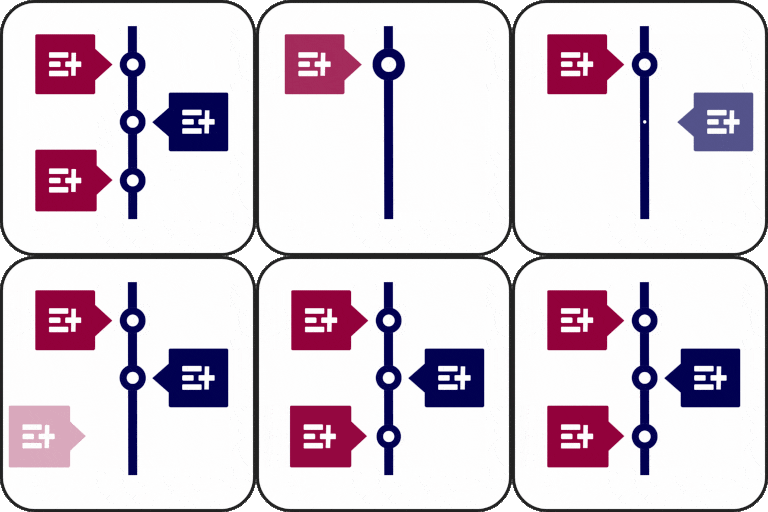
Elementor Timeline – Vertical & Horizontal Timeline Timeline Widget for Elementor is a powerful timeline slider plugin that allows you to create stunning vertical and horizontal timelines to showcase your achievements, personal journey, or company history directly inside Elementor. Whether you’re showcasing a company history, project roadmap, personal journey, or blog timeline. With multiple designs and customization options for colors, fonts, and icons, you can easily design your Elementor timelines according to your brand. Key Features Compatibility with Elementor: Fully integrated with Elementor, simply drag and drop the timeline widget into any page and start customizing your timeline sliders visually. Story Timeline: Perfect for showcasing any type of story or chronological content like company history, career paths, product journeys, or blog timelines. Multiple Layouts: Choose between vertical timelines or horizontal layouts according to your preferences. Pre-made Templates: Use pre-designed timeline slider layouts to quickly create a timeline. Just choose a template, add your content, and customize it to match your style. Font Awesome Icons Support: Assign icons to each timeline step using the built-in Font Awesome library according to the story. Custom Labels: Add personalized text labels to each timeline step and display important details like dates, years, event names, or step numbers. Image & Multimedia Support: Enhance your timeline’s engagement using interactive images that visually tell your story. Timeline Customization: Customize typography, colors, backgrounds, spacing, and borders of your story elements for a more personalized look. Content Alignment Options: Align your text and media (left, right, or center) according to your design and layout. Compatible with all WordPress Themes: Timeline widget plugin is fully compatible with all WordPress themes. Fully Responsive: This plugin is fully responsive, ensuring that your events display perfectly on all screen sizes. 🔗Check Free Version Demos Use Cases Company Achievements: Highlight your company’s milestones and achievements. Historical Timelines: Show historical events or company history. Step-by-Step Guides: Visualize processes or tutorials in a timeline format. Program Timelines: Display program schedules or phases clearly. Event Timelines: Highlight past and upcoming events effectively. Job Stories/Personal Milestones: Share job histories or personal achievements. Work Experience Timelines: Create timeline sliders of work experience for resumes or portfolios. Product Roadmaps: Show product development stages and future plans. Brand Stories: Tell your brand’s story in an engaging way. Upgrade to Pro Version Upgrading to the Timeline Widget Pro unlocks more advanced features like: Layout Options: Choose from Vertical, Horizontal, and One-Sided timelines to match your design needs. Preset Styles: Set up beautiful timeline sliders in one click with styles like elegant, minimal, and classic. Post Timeline: Display your blog posts in an attractive timeline layout. Advanced Style Settings: Customize your timeline’s look to match your website’s design. Animation Effects: Bring your timelines to life with over 15 animation effects like fade-in, flip-up, and zoom. Colors & Typography: Easily adjust text size, fonts, and colors for a perfect look. Custom Color Stories: Use different colors for each story in your timeline for a vibrant effect. Image/Video/Slideshow: Add images, videos, or slideshows to your timeline. Ajax Load More: Load more stories as users scroll down the timeline. Icons in Timeline: Use icons, custom text, or images as timeline markers. 🔗 Check Pro Version Demos | Get Pro Check our other plugins demos Cool Timeline: Display your company’s history, product roadmaps, personal stories, or key events using the built-in block or via simple shortcode. View Demo Timeline Block For Gutenberg: Create interactive timelines directly within the WordPress Block Editor to display step-by-step tutorials, a company’s history, and a product roadmap. View Demo Timeline Module Pro For Divi: Showcase your personal story or company history using stunning vertical or horizontal timelines directly inside the Divi Builder. View Demo Use of 3rd Party Services: This plugin connects to the Cool Plugins API to display information about related plugins inside the dashboard. It also offers optional usage tracking and optional feedback submission on deactivation. Data is sent only after explicit user consent. No hidden tracking is performed, and no frontend visitor or site user data is collected. For more details, please review our Data Usage Policy, TOS, and Privacy Policy.