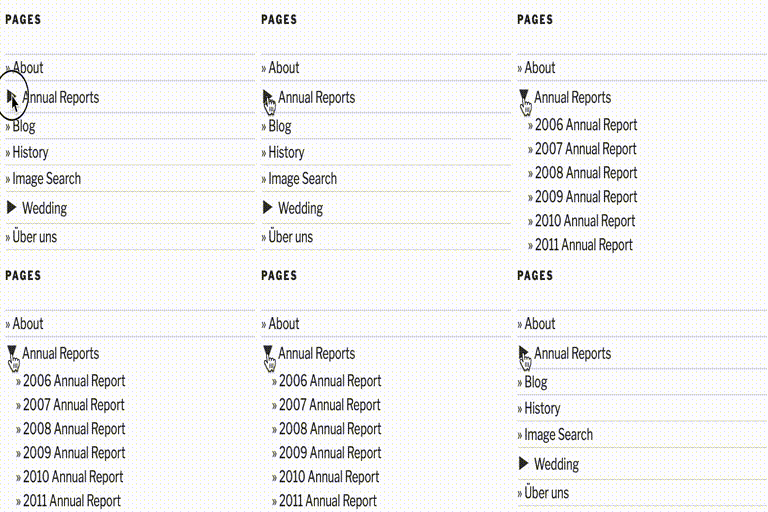
Collapsing Pages
This is a very simple plugin that uses Javascript to form a collapsable set of links in the sidebar for the pages. Every page corresponding to a given parent page will be expanded. It is largely based off of my Collapsing Pages and Collapsing Pages plugins. What’s new? 2.0.3 (2024.01.01) Fixed issue with subsubpages not closing correctly Got rid of some more warnings Tested with 6.4.2 2.0.2 (2023.12.01) Got rid of some warnings Updated deprecated property __experimentalGroup Tested with 6.4.1 2.0.1 (2023.06.16) Bug fixes 2.0.0 (2023.03.17) Updated to use Gutenberg block 1.0.1 (2016.05.09) Fixed bug where sometimes setting accordion to false broke javascript 1.0 (2015.08.12) Compatible with WordPress 4.3 Fixed bug where expanding symbol showed up at lowest depth specified instead (thanks to tkibler for pointing it out) Added option to only display pages of the current subpage Added option to show top-level page (previously it was always shown) Added accordion style option Cleaned up widget settings improved style management, including the ability to specify style per widget Switched from unicode symbols to html entities Not showing tags for title if empty Fixed bug with title attribute of pages Totally rewrote javascript Options If using the manual version, you can pass options either as an array, or using the query style, just like for other wordpress functions such as wp_list_pages $defaults=array( 'title' => __('Pages', 'collapsing-pages'), 'sortOrder'=> 'ASC' , 'sort'=> 'pageName' , 'defaultExpand'=> '', 'expand' => 0, 'depth' =>-1, 'inExcludePage' => 'exclude', 'linkToPage' => true, 'inExcludePages' => '', 'showPosts' => false, 'animate' => 0, 'useCookies' => true, 'postTitleLength' => 0, 'showTopLevel' => true, 'currentPageOnly' => false, 'debug' => false, ); inExcludePage Whether to include or exclude certain pages ‘exclude’ (default) ‘include’ inExcludePages The pages which should be included or excluded showPosts Whether or not to include posts as well as pages. Default if false linkToPage True, clicking on a parent page title will link to that page (default) False, clicking on a parent page will expand to show sub-pages sort How to sort the pages. Possible values: ‘pageName’ the title of the page (default) ‘pageId’ the Id of the page ‘pageSlug’ the url of the page ‘menuOrder’ custom order specified in the pages settings sortOrder Whether pages should be sorted in normal or reverse order. Possible values: ‘ASC’ normal order (a-z 0-9) (default) ‘DESC’ reverse order (z-a 9-0) expand The symbols to be used to mark expanding and collapsing. Possible values: ‘0’ Triangles (default) ‘1’ + – ‘2’ [+] [-] ‘3’ images (you can upload your own if you wish) ‘4’ custom symbols customExpand If you have selected ‘4’ for the expand option, this character will be used to mark expandable link categories customCollapse If you have selected ‘4’ for the expand option, this character will be used to mark collapsible link categories postTitleLength Truncate post titles to this number of characters (default: 0 = don’t truncate) animate When set to true, collapsing and expanding will be animated useCookies When true, expanding and collapsing of pages is remembered for each visitor. When false, pages are always display collapsed (unless explicitly set to auto-expand). Possible values: true (default) false showTopLevel True – show top level pages (default) False – only display sub-pages and below currentPageOnly True – show only parent and sub pages of the current page False – show all pages (subject to the include or exclude parameters set) (default) debug When set to true, extra debugging information will be displayed in the underlying code of your page (but not visible from the browser). Use this option if you are having problems Examples collapsPage('animate=true&sort=ASC&expand=3,inExcludePages=about') This will produce a list with: * animation on * shown in alphabetical order * using images to mark collapsing and expanding * exclude page about Demo I use this plugin in my blog at http://blog.robfelty.com CAVEAT Currently this plugin relies on Javascript to expand and collapse the links. If a user’s browser doesn’t support javascript they won’t see the links to the posts, but the links to the pages will still work (which is the default behavior in wordpress anyways)
Top keywords
- pages18×2.59%
- page12×1.73%
- default11×1.59%
- true11×1.59%
- false10×1.44%
- collapsing6×0.86%
- expand6×0.86%
- option6×0.86%
- expanding5×0.72%
- javascript5×0.72%
- order5×0.72%
- set5×0.72%
Nav Menu Roles
This plugin lets you hide custom menu items based on user roles. So if you have a link in the menu that you only want to show to logged in users, certain types of users, or even only to logged out users, this plugin is for you. Nav Menu Roles is very flexible. In addition to standard user roles, you can customize the functionality by adding your own check boxes with custom labels using the nav_menu_roles filter and then using the nav_menu_roles_item_visibility filter to check against whatever criteria you need. You can check against any user meta values (like capabilities) and any custom attributes added by other plugins. IMPORTANT NOTE In WordPress menu items and pages are completely separate entities. Nav Menu Roles does not restrict access to content. Nav Menu Roles is only for showing/hiding nav menu items. If you wish to restrict content then you need to also be using a membership plugin. Usage Go to Appearance > Menus Set the “Display Mode” to either “logged in users”, “logged out users”, or “everyone”. “Everyone” is the default. If you wish to customize by role, set the “Display Mode” to “Logged In Users” and under “Restrict menu item to a minimum role” check the boxes next to the desired roles. Keep in mind that the role doesn’t limit the item strictly to that role, but to everyone who has that role’s capability. For example: an item set to “Subscriber” will be visible by Subscribers and by admins. Think of this more as a minimum role required to see an item. Support Support is handled in the WordPress forums. Please note that support is limited and does not cover any custom implementation of the plugin. Before posting, please read the FAQ. Also, please verify the problem with other plugins disabled and while using a default theme. Please report any bugs, errors, warnings, code problems to GitHub
Top keywords
- menu10×3.09%
- roles8×2.47%
- nav6×1.85%
- nav menu6×1.85%
- role6×1.85%
- users