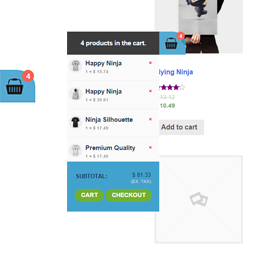
Caddy – WooCommerce Side Cart & Free Shipping Bar
Caddy is a high performance WooCommerce side cart plugin (also known as a floating cart, sliding cart, cart drawer, or mini cart) that improves your store’s shopping experience and helps grow your sales. It replaces the default WooCommerce cart page with a sticky AJAX side cart that slides in from the edge of the screen, letting customers manage their cart without leaving the page. Built on Modern WordPress APIs Caddy v3 is built from the ground up on the WordPress Interactivity API and the WooCommerce Store API – the same modern foundations that power WooCommerce’s own cart and checkout blocks. This means: Instant AJAX cart updates – no full-page reloads. Cart changes are reactive and immediate, making it the fastest WooCommerce AJAX side cart available. Server-synced state – every cart operation goes through the official WooCommerce Store API, ensuring accurate prices, tax calculations, and stock validation. Lightweight floating cart – no jQuery dependency. Caddy uses native ES modules loaded as WordPress script modules for the smallest possible footprint. Future-proof – built on the same APIs WordPress and WooCommerce are investing in long-term. Increase average order value with Caddy’s built-in in-cart upsells and cross-sell product recommendations, reduce cart abandonment with a free shipping bar, and encourage repeat shoppers with a save for later wishlist. 🛒 Side cart, mini cart & floating cart drawer in one 🚚 Free shipping bar to lift average order value ⚡️ Built on WordPress Interactivity API & WooCommerce Store API 📱 Mobile friendly responsive design 🔄 Real-time reactive cart updates 🌏 Translated into 6 languages ⚔️ Cross-browser and cross-OS battle tested 🔒 Secure and reliable 💡 Lightweight – no jQuery dependency 💰 Boosts sales and average order value 🔄 Works with most themes and plugins 🎁 Apply cart discounts and promo codes Try the Demo | Cart Optimization Playbooks | Visit usecaddy.com Caddy Lite features: Sticky floating side cart / mini cart powered by the WordPress Interactivity API – available across your whole site Slide-in cart drawer that opens like an add-to-cart popup – no page reloads Real-time AJAX cart operations via the WooCommerce Store API – no page reloads Free shipping bar (progress meter) that shows customers how close they are to free shipping In-cart upsell and cross-sell product recommendations when customers add to cart Save products for later / wishlist (logged-in users) Quick AJAX add to cart from shop and archive pages – no page reload Cart and saved list links for your navigation menu (shortcodes + widgets) Elementor widgets: drag a “Caddy Cart” or “Caddy Saved Items” element into any Elementor header or layout, with full icon, label, and count-badge styling; clicking opens the side cart and the count stays live Add products & manage cart items without reloading the page Manage cart quantities directly in the side cart Sticky add-to-cart bubble (floating cart icon) with a live quantity indicator Apply coupon codes in the side cart Custom CSS to match your brand WooCommerce HPOS support No jQuery dependency – pure ES modules Supported Languages Caddy is translated into the following languages: English (default) German (Deutsch) French (Français) Italian (Italiano) Brazilian Portuguese (Português do Brasil) Spanish (Español) Compatibility Caddy is compatible with most themes and plugins. The following themes and plugins have been tested and confirmed working: Plugins: WooCommerce Subscriptions, WooCommerce Product Bundles, All Products For WooCommerce Subscriptions, Elementor, Divi Themes: GeneratePress, Flatsome, Astra, Hello Elementor, Kadence, OceanWP, Storefront Upgrade to Pro Upgrade to Pro and unlock powerful customization features, analytics, recommendations, and more. Caddy Pro features: 7 different cart icon styles & 30+ custom color options Cart tracking & analytics dashboard Multi-tier reward levels with free shipping, free gifts, and discounts Workflow automation engine – trigger targeted product recommendations, popup notifications, and auto-apply coupons based on cart contents, cart total, product categories, page, and customer role In-cart announcement bar In-cart product subscription upsells using with the All Products for WooCommerce Subscriptions extension Change the cart bubble position on the screen Display notices when adding to cart or adding/removing saved products Promote custom coupon offers in the cart Set free shipping meter exclusions Set product recommendation exclusions Set product recommendation fall-back rules Show save for later buttons on product pages and shop archives Manage placement of save for later buttons on shop archives Customize a welcome message to new users Hide Caddy on specific pages Hide out of stock products from product recommendations Get priority email support Get early access to new features Upgrade to Pro Now: https://www.usecaddy.com/ External services Caddy connects to the following external services. Nothing is sent to any of them on the storefront, and nothing about your customers, orders or products is ever included. usecaddy.com (Caddy) Usage data (opt in, off by default). Used to understand which features are in use. If you accept the prompt in your admin, Caddy sends a weekly snapshot: your site URL, an anonymous install ID, WordPress, PHP and WooCommerce versions, active theme, locale, multisite status, the Caddy version, how long Caddy has been installed, and which Caddy features are switched on. Turn it on or off anytime under Caddy > Settings > General > Help Improve Caddy. Deactivation feedback (optional). If you fill in the short form shown when deactivating Caddy, your answer is sent along with your site URL and the same environment details. Skipping the form sends nothing. Resources screen. When an admin opens Caddy > Resources, WordPress requests the public playbooks feed from https://usecaddy.com/feed/. This is a standard HTTP request with no site data beyond what any feed request carries (your server’s IP address and user agent). The result is cached for 12 hours. These are covered by the Caddy terms and privacy policy.
Floating Minicart for WooCommerce
Is your checkout process killing your conversion rates? Every time a customer has to leave their shopping path to “View Cart,” you risk losing them to distractions. Floating Minicart for WooCommerce eliminates this friction. This plugin provides a sleek, slide-out minicart that stays accessible no matter where your customer is on your site. By allowing users to view, manage, and proceed to checkout without ever leaving their current page, you keep them in the “buying flow.” Why Store Owners Choose Floating Minicart Zero Friction: Customers can review their order, adjust quantities, or remove items instantly. Boost Upsells: The empty-state recommendations feature displays your “Best Selling” products, turning a moment of emptiness into a discovery opportunity. Stay in Context: Users no longer need to navigate to a dedicated cart page just to see their subtotal or edit their selection. Built for Performance: Engineered with modern CSS variables and hardware-accelerated animations, ensuring zero impact on your site’s Core Web Vitals. Features Slide-Out Mechanics: Professional, smooth, hardware-accelerated drawer animation. Strategic Positioning: Choose between left or right screen alignment to match your theme’s layout. Fully Customizable: Match your brand identity with custom primary, secondary, and button color controls. Intelligent Empty States: Don’t just show an empty box—drive sales by displaying “Popular Products” and a quick “Return to Shop” link. Responsive & Mobile Ready: Flawless experience across all device types. Real-time Notifications: Subtle, eye-catching badge counters keep users updated on their cart items. WooCommerce Native: Perfectly integrated into the WooCommerce settings panel for easy management. Support & Contribution We believe in the power of open-source. Join our community and contribute to the growth of this plugin on GitHub.