Booking and Rental Manager for Bike | Car | Resort | Appointment | Dress | Equipment
Booking and Rental Manager for WooCommerce helps you build a rental booking system inside WordPress and WooCommerce. Create single-day, multi-day, appointment, resort, equipment, dress, and multi-item rentals, then accept bookings through the WooCommerce checkout flow. Use it for car rentals, bike rentals, equipment rentals, dress rentals, appointment booking, resort booking, vacation rentals, parking, boat rentals, sports kits, office spaces, and other rental businesses that need date-based booking, pricing, inventory, and order management. Demo and documentation Frontend live demo Documentation Pro version What you can build Car and bike rental websites Equipment and tool rental websites Dress and costume rental websites Appointment booking systems Resort and room booking websites Vacation rental and holiday rental websites Boat, sports kit, parking, and office space rental websites Multi-item rental catalogs with separate item quantities Key free features WooCommerce-based rental checkout and payment flow Single-day and multi-day rental booking Multi-item rental support Appointment and resort booking support Hourly, daily, weekly, monthly, day-wise, day-long, and day-night pricing options Pickup and drop-off location settings Inventory and availability controls Extra services and add-ons Dress size configuration Related rental items and highlighted features Rental galleries, sliders, and multiple list layouts Frontend customer booking dashboard Order list with booking details Tax settings and WooCommerce payment gateway support Responsive layouts and multilingual translation support Shortcodes for rental lists and single-item booking forms Pro features Booking calendar with order details Reports with order details CSV export for reports PDF booking receipts Booking-related email features View Pro version Video overview Shortcodes Show rental items: [rent-list type='' style='grid' show='' columns='' left-filter='yes/no' category='' order='DESC'] Show only single-day bike/car rentals: [rent-list type='bike_car_sd'] Show grid-style rental list: [rent-list style='grid' left-filter='yes/no'] Show list-style rental list: [rent-list style='list' left-filter='yes/no'] Show six rental items: [rent-list show='6'] Show rental items in ascending order: [rent-list order='ASC'] Show a four-column rental list: [rent-list columns='4'] Show rentals from selected category IDs: [rent-list category='2,3'] Show the booking form for one rental item: [rent-add-to-cart id='1'] Support Need help or want to suggest an improvement? Use the support form. Theme compatibility The plugin is designed to work with standards-compliant WordPress themes. Other plugins Booking and Rental Manager for WooCommerce Addon: Seasonal Pricing Bus Booking Manager Bus Ticket Booking with Seat Reservation WooCommerce Events Manager Privacy Policy Booking and Rental Manager for WooCommerce uses the Appsero SDK to collect basic telemetry data only after the user gives permission through the admin notice. This helps with troubleshooting and product improvements. Appsero does not collect data by default. Data collection starts only after user consent. Learn more about how Appsero collects and uses data.
Top keywords
- rental25×5.58%
- booking19×4.24%
- show11×2.46%
- rentals9×2.01%
- rent-list8×1.79%
- order7×1.56%
- woocommerce7×1.56%
- support6×1.34%
- websites6×1.34%
- list5×1.12%
- manager5×1.12%
- rental websites5×1.12%
WP Booking System – Booking Calendar
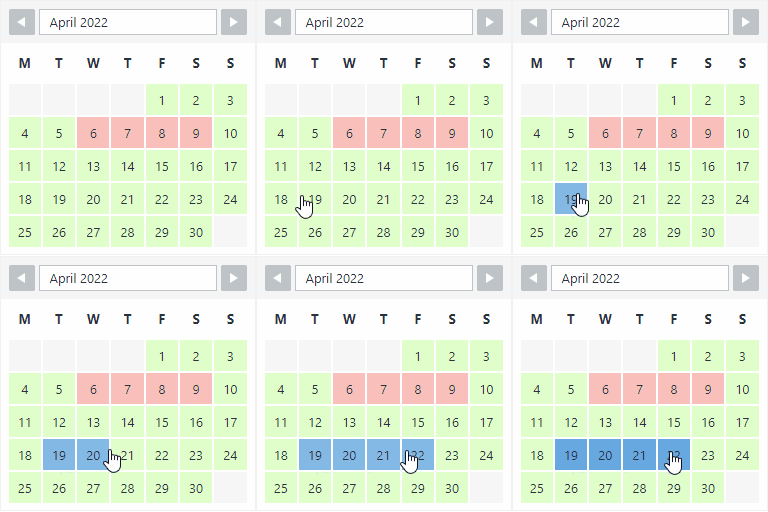
The booking calendar plugin for WordPress. WP Booking System is used by more than 10,000 active users, with a satisfaction rate that borders on 5*! Is this booking calendar for you? Do you rent something out, like a holiday home, a boat or something else? Do you have a WordPress website and need a bit of help to keep track of your rentals through a booking calendar? …then yes! The WP Booking System is perfect for your needs. Get easy online booking with this lightweight and powerful booking system. A set-and-forget booking calendar for your rental business WP Booking System is a simple booking calendar for WordPress. You will be up and running in just a few minutes. You can create booking calendars and forms, and you can manage your bookings. You can easily customize the booking calendar to fit your needs. Start receiving bookings from your visitors today! Display available dates in your booking calendar With just one click you can create the first booking calendar for your holiday home or rental business. Already have bookings made? You can manually manage the calendar’s availability in just a few seconds. Now your booking calendar is up to date with the latest bookings and available dates! Create a form and enable clients to make bookings online The beauty of this WordPress booking calendar is that it allows your website visitors to book available calendar dates on the spot through a fully customizable booking calendar form. Enable your clients to use the rental calendar fast and easy. In just three simple steps, clients will be able to reserve a slot on your booking calendar: Hover over the booking calendar to pick a starting date. Click on it, then move the cursor to select the number of days to book. (clients can easily see booked days by using the booking system legend) Next, fill in the booking system form (you can edit the form fields at any time to make sure clients submit the most relevant information you need; mark fields as compulsory or optional) Finally, click the booking button to make a reservation. With the premium version of the booking system, you can allow customers to make online bookings using the top payment platforms available at the moment! Click here to see a demo of the premium version You can review and manage calendar bookings from the back-end, so you are always in control. You can even set up automatic calendar notifications so you will receive an email when a booking is made. Now you’re all set to receive online bookings through your booking calendar. Receive and manage bookings All your bookings are saved in your rental calendar and are beautifully displayed so you can easily access them and view the booking details. No time to read the description? Discover the top benefits of WP Booking System in just 40 seconds! Features of the Free version: Create your own booking system: a booking calendar and a booking form! Receive and manage bookings Save extra booking information Generate a shortcode to insert the booking calendar and booking form into a page or post Use the Gutenberg block to embed the booking calendar WP Booking System Widget The booking calendar supports multiple languages EXTRA FEATURES OF THE PREMIUM BOOKING CALENDAR VERSION: The booking system can accept online and offline payments iCalendar Sync, Import and Export Create an unlimited number of booking calendars Create an unlimited number of booking forms Create your own rental calendar legend: apply your own colors and text Split days selection Display multiple months Change the first day of the week Change the start month / year Display an overview reservation calendar Edit multiple dates with just one click Display tooltips with extra info Hide calendar bookings from the past from your visitors Set the minimum number of days that the visitor must book Show the week’s number on the booking calendar Automatically block booked days directly Send booking notifications User management within the booking system Very easy to translate into any language Professional support for any question related to the booking calendar Download the Premium version at: www.wpbookingsystem.com This WP Booking Calendar Plugin is for… Any rental business should use the WP Booking Calendar plugin to keep track of their rental calendar throughout the year. Property rentals: bed & breakfast, hotels, hotel rooms, cottages, apartments, houses, apartment rooms (use WP Booking System even when you are renting through AirBNB, Booking.com etc.) Boat rentals Car & motorcycle rentals Sports equipment rentals (full day ski equipment rental, bike rentals, skates rentals etc) Events rentals (full day trainings/courses, parties, weddings, baptisms, corporate events, business meetings, conferences etc) Speakers, singers, photographers, videographers, inspectors can also benefit from using WP Booking system The booking system will soon become an indispensable tool in your business, and you will find yourself using it daily to manage reservations in your calendar. How the booking calendar helps your clients Clients can make calendar bookings online, by accessing your website No need to call to make a reservation They can see the available calendar dates and manage their schedule to make a booking They can make simple and fast bookings from the comfort of their own home, directly from their mobile phones Key booking system benefits for your business Collect relevant information about your clients through the booking system form (configure the rental calendar form to your needs). No need to call or collect this information at the desk. Use the WP Booking System on the go, from your mobile phone. The WP Booking Calendar can be used from mobile devices with ease – simply log in to your website and make any necessary edits just like on a computer. Manage bookings offline – when you meet with a client 1:1 and they want to make a future booking, simply log in to your website, access the booking calendar and make the reservation on the spot, for them. Stay up to date with calendar bookings by receiving email confirmations and reminders WP Booking System in a nutshell… Get organised and start receiving bookings with WP booking system. With this WP plugin you can create booking calendars, booking forms and accept bookings via your website. Setting it up is really easy and you will be up and running in just a few minutes. Bookings will be clearly listed in your booking calendar and you can stay organised. The booking calendar plugin works simply and it can be translated into several languages.