Authors List
Easily display a list or grid of post authors (or any other user role) and links to their post archives page using a shortcode. Backend UI can be used to change all the options. Introducing New Authors List Pro The free version offers a large amount of features for free, and the PRO version comes with even more amazing features for your authors list. Some of those features are Styler, Search and Filters. Styler allows easy change of color/typography/spacing on any of the elements in the authors list. Filters allow you to create a better organization of the authors list. Search allows your visitors to search for specific users. Click here to get the PRO version! Shortcode All the options are available in the WP admin but you can also use a plain shortcode (as it was in version 1 of the plugin). The shortcode is [authors_list] and accepts the following attributes. style (1,2,3) columns (2,3,4) columns_direction ( horizontal, vertical ) avatar_size (any number, example 500) amount (any number, no limit by default) show_title (yes,no) show_count (yes,no) show_bio (yes,no) show_link (yes,no) orderby ( post_count, post_date, ID, login, nicename, email, url, registered, display_name, first_name, last_name ) order ( ASC, DESC ) skip_empty ( yes, no ) minimum_posts_count ( any number ) bio_word_trim ( any number, leave empty for no trim ) only_authors ( yes, no ) exclude ( user IDs separated by comma, example 1,3,4 ) include ( user IDs separated by comma, example 1,3,4 ) roles ( roles separated by comma, example administrator,editor ) latest_post_after ( for example if set to 7 it will only show authors that have posts published in the past 7 days ) name_starts_with ( limit to authors whose display name starts with specific characters ) first_name_starts_with ( limit to authors whose first name starts with specific characters ) last_name_starts_with ( limit to authors whose last name starts with specific characters ) categories ( category IDs separated by comma, example 1,3,4 ) terms ( term IDs separate by comma, example 1,3,4 ) taxonomy ( name of a taxonomy, for example post_tag ) title_element (the element that wraps the name of the user/author, defaults to div, can be any element, for example h2) link_count (yes, no) Example usage with attributes: [authors_list style="2" columns="2" amount="4" show_count="no"] There are additional attributes for custom content before and after each element: before_avatar before_title before_count before_bio before_link after_avatar after_title after_count after_bio after_link Example usage with attributes: [authors_list before_title="My custom content"] These before/after attributes also support dynamic user/author meta fields using {al:INSERT_FIELD_NAME} Example usage: [authors_list before_title="My first name is {al:first_name}"] They also support some dynamic output functionality. Currently supports displaying posts links and social links (Yoast SEO needed): Example usage for posts links: [authors_list after_title="{alf:posts}"] [authors_list after_title="{alf:posts type=plain amount=5}"] Example usage for social links: [authors_list after_title="{alf:social}"] Example usage for roles: [authors_list after_title="{alf:role}"] Example usage for link (the “to” parameter accepts foollowing values: archive bbpress_profile buddypress_profile): [authors_list after_title="{alf:link to=bbpress_profile}"] Social Icons SVGs by FontAwesome are licensed under CC BY 4.0 What’s Next If you like this plugin, then please consider leaving us a rating / review. This plugin is maintained by WPKube, a WordPress resource site, where you can learn from our in-depth guides such as What is WordPress, How to choose a WordPress hosting, & more! Our Other Projects Optin Forms: Simple and easy to use plugin for creating optin forms, works with most well known autoresponder services. Simple Basic Contact Form: Light-weight contact form plugin Subscribe to Comments Reloaded: Email Notification plugin for Comments Advanced Excerpts: This plugin adds several improvements to WordPress’ default way of creating excerpts.
Top keywords
- authors19×2.84%
- example16×2.40%
- list14×2.10%
- name14×2.10%
- authors list13×1.95%
- title11×1.65%
- count7×1.05%
- example usage7×1.05%
- usage7×1.05%
- yes7×1.05%
- link6×0.90%
- name starts6×0.90%
Restaurant Food Menu by WP Darko – Drag & Drop Restaurant Menu Builder for WordPress
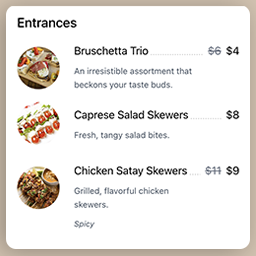
Quickly set up and display a restaurant menu on your website, fully responsive and easy to use. Create food items, add them to your restaurant menu and copy-paste the shortcode into any posts/pages. WordPress Restaurant Menu Builder plugin Introducing WP Darko’s new restaurant menu builder. We’ve designed this WordPress plugin to be as user-friendly as possible, making it ideal for beginners. You can begin building captivating food lists within minutes. When activated, WP Darko’s restaurant menu builder will add two new sections to your WordPress admin panel: “Food Items” and “Food Menus.” These sections will enable you to effortlessly create restaurant menus by adding food items (complete with food descriptions, regular and sale prices, food images, and more), add them to one or multiple menus and display them anywhere on your website using your restaurant menu shortcodes. Get Started in Minutes with Restaurant Food Menu Drag & Drop Restaurant Menu Builder Restaurant Food Menu is an intuitive drag & drop food menu builder plugin for WordPress. After you’ve added your food items in the admin panel, it only takes a few minutes to display your restaurant menu beautifully on your page. Simply create a new menu, then drag & drop your food items from the food list into your menu sections. Adjust the menu’s layout, add headings, and paragraphs to make it look like an authentic restaurant menu, and you’re good to go! With this WordPress plugin, WP Darko ensures that you can focus on what matters most: your restaurant business. Creating a restaurant menu for your WordPress site is easy with our menu builder, and you should be able to have yours ready in minutes. Available fields & settings When creating food items in the admin panel, you’ll be able to use the following fields: Food title Food image Regular and sale price: if you add a sale price to your food item, the regular price will be crossed out Additional info: this is a free field where you can add information about the food, such as spiciness level, allergies, gluten-free, vegetarian, and more Food description: here is where you can let your creativity shine and describe your food in a way that makes it sound delicious to your visitors Fully Responsive and Optimized Restaurant Food Menu is a 100% mobile-friendly and fully responsive restaurant menu builder plugin for WordPress that has been tested with a wide range of devices and browsers. The menu’s food sections will gracefully transition from 3-2 columns to a single column on smaller devices, ensuring they remain perfectly readable and visually appealing. Our WordPress restaurant menu plugin is also fully compatible with the latest versions of WordPress and PHP. The future of our Restaurant Food Menu WordPress plugin Restaurant Food Menu was recently released, and we have exciting plans for its future. We are planning to introduce new features very soon! Among these upcoming features, we will provide the option to include full-width images within the restaurant menu, allowing you to align it more closely with your food business. Additionally, we will be working on various options for indicating spiciness levels, allergies, and different dietary preferences. We have an extensive roadmap, and you can contribute to it by reaching out to us and sharing your ideas for the direction you’d like this food menu builder WordPress plugin to take!