Zorem Local Pickup for WooCommerce
Zorem Local Pickup extends WooCommerce’s default Local Pickup shipping method into a full click-and-collect fulfillment workflow — with dedicated order statuses, automated customer notifications, and customizable pickup instructions. Out of the box, WooCommerce Local Pickup has no way to tell customers their order is ready for collection, no pickup-specific order status, and no mechanism to share pickup instructions. This plugin fixes all of that, giving you and your customers a clear, professional pickup experience from order placement to collection. HPOS Compatible · 3,000+ Active Stores · Free & Open Source How It Works A customer places an order and selects Local Pickup at checkout. You prepare the order and mark it as Ready for Pickup — the customer instantly receives an email with pickup instructions, location details, and store hours. The customer collects their order. You mark it as Picked Up — optionally sending a final confirmation email. No complex setup. Works with your existing WooCommerce Local Pickup configuration. What’s Included in the Free Version “Ready for Pickup” order status — A dedicated status that triggers an automatic email notification to the customer, letting them know their order is ready for collection. “Picked Up” order status — A second status to confirm collection, with an optional confirmation email. Automated email notifications — Emails fire automatically when you change the order status — no manual messaging needed. Customizable email content — Modify the subject line, heading, and body content of both pickup status emails from the WooCommerce email customizer. Pickup location setup — Add your store name, address, opening hours, and special pickup instructions. These appear automatically in the Ready for Pickup email. Pickup instructions in the Processing email — Optionally show pickup details in the initial order confirmation email so customers know what to expect right away. Pickup instructions on the Thank You page — Display pickup instructions on the order received page immediately after checkout. Bulk order actions — Change multiple orders to Ready for Pickup or Picked Up in bulk from the WooCommerce orders list. HPOS Compatible — Fully compatible with WooCommerce High-Performance Order Storage. Free vs PRO — What’s the Difference? The free version covers single-location pickup workflows. ALP PRO is built for stores with multiple locations, appointment scheduling, and advanced fulfillment needs. ALP Free includes: Ready for Pickup and Picked Up custom order statuses Automated email notifications for both statuses Single pickup location with name, address, hours, and instructions Customizable email content (subject, heading, body) Pickup instructions on Thank You page and Processing email Bulk order status actions HPOS compatible ALP PRO adds: Multiple pickup locations — Add and manage unlimited pickup points, each with its own address, hours, instructions, and contact details. Pickup appointment scheduling — Let customers choose a pickup date and time slot during checkout, with configurable availability per location. Split work hours by day — Define different opening hours for each day of the week per location. Restrict pickup locations by product or category — Assign specific products or categories to specific pickup locations only. Mixed pickup + shipping orders — Support orders where some items are shipped and others are picked up in the same transaction. Per-item pickup from different locations — Allow different items in one order to be picked up from different locations. Location-specific email notifications — Send Ready for Pickup emails from the specific location handling the order, with that location’s details. Pickup discounts — Offer a discount or fee per pickup location to incentivize in-store collection. Force local pickup — Make local pickup the only available shipping method for specific products or categories. Display pickup availability messages — Show customers when pickup is available before they reach checkout. Google Maps integration — Sort pickup locations by distance from the customer’s address. Custom email templates — Advanced pickup email styling and layout customization. Priority support — Faster, dedicated assistance from the Zorem team. 👉 Get ALP PRO Compatible With Zorem Local Pickup is tested and compatible with: Email customizers — Kadence WooMail, YayMail, WP HTML Mail SMS notifications — SMS for WooCommerce Multilingual — WPML (special instruction text translatable) Page builders — Elementor, Divi Subscriptions — WooCommerce Subscriptions (pickup instructions in renewal emails) Multi-vendor — Dokan, WCFM Marketplace Full compatibility list → Translations Zorem Local Pickup is fully translatable. Current translations include English, German, Spanish, French, Hebrew, and Italian. Translate into your language → Documentation & Support 📖 Full documentation and setup guides 💬 WordPress.org support forum More Plugins by Zorem Advanced Shipment Tracking for WooCommerce — The #1 WooCommerce shipment tracking plugin. Trusted by 80,000+ stores. SMS for WooCommerce — Automated SMS order and shipping notifications via Twilio, WhatsApp, and 18 other providers. Zorem Returns — Self-service returns, exchanges, and store credit management for WooCommerce. Customer Email Verification PRO — Block fake accounts and spam orders with OTP-based email verification. Country Based Restrictions PRO — Restrict products and payment gateways by customer country using WooCommerce geolocation. Explore the full catalog at zorem.com →
Top keywords
- pickup44×5.60%
- order20×2.54%
- email19×2.42%
- woocommerce13×1.65%
- instructions11×1.40%
- local9×1.15%
- local pickup9×1.15%
- pickup instructions9×1.15%
- customer8×1.02%
- location8×1.02%
- ready8×1.02%
- status8×1.02%
WC Pickup Store
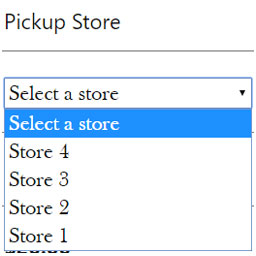
WC Pickup Store is a shipping method that lets you to set up a custom post type “store” to manage stores in WooCommerce and activate them for shipping method “Local Pickup” in checkout page. It also includes several options to show content by Widget or a WPBakery Page Builder component. Configuration of shipping costs are also available globally or per stores. More about documentation and filter usage in my website keylormendoza.com Check or request a custom PRO add-on here Features And Options: Shipping costs globally or per stores. Compatible with WPBakery Page Builder with its own addon. Widget option. Dropdown of stores on the Checkout page. Local pickup details in thankyou page, order details and emails. Archive template is now available. All templates from /wc-pickup-store/templates/ can be overridden in your custom themes. Filters and actions are available throughout the code to manage your own custom options. Font Awesome and Bootstrap CSS libraries are included in the plugin. You can disable them from the plugin configuration page Shipping email notification to stores in the store admin page Order and orderby options Shipping costs by flat rate or percentage, by method or per stores Filter wps_settings_data to edit shipping title and other settings Store details on Checkout page. Includes filters, template and JS trigger pickup_store_selected Multicountry stores are available. Just choose a country per store and they will be filtered on the Checkout page. NEW Tax handling for WC Pickup Store shipping method option (v1.7.0) Some Useful Hooks These are some useful filters and actions that you might need to extend the plugin functionalities wps_store_query_args to edit the query of stores wps_no_stores_availables_message message to show when no stores are available to display in the Checkout wps_first_store choose the first selected store wps_store_pickup_cost_label label for store pickup costs wps_shipping_costs override method shipping costs wps_order_shipping_item_label method title with instructions wps_subtotal_for_store_cost subtotal to calculate percentage shipping costs woocommerce_shipping_wc_pickup_store_is_available check for shipping method availability wps_settings_data to edit the plugin settings including the shipping title wps_get_store_custom_fields to choose the custom fields to be returned in wps_stores_fields function wps_stores_fields all custom information by store wps_formatted_shipping_title shipping method title on Checkout wps_disable_country_filtering disable filtering by country
Top keywords