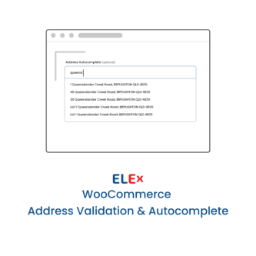
ELEX WooCommerce Address Validation & Google Address Autocomplete Plugin
ELEX WooCommerce Address Validation & Google Address Autocomplete Plugin helps to improve customer service by assisting shoppers when they place orders. The plugin will help you to decrease the number of delivery delays due to an incorrect address entry. This plugin aids in validating & verifying the addresses of the customers before placing order to maximize your store’s throughput. Integrated with EasyPost Address Verification API(Free), UPS Address Validation API(Premium), USPS Address Validation API(Premium) & AddressFinder Address Validation & AutoComplete API(Premium). Also, plugin comes with Address Auto-Correction & autocompletion using super efficient Google Address Autocomplete API. Features: Address autocomplete using Google Address Autocomplete API. Automatic Address validation using EasyPost Address Verification APIs Option to toggle manual and automatic address validation. Customisable Popup window for user prompted manual address validation. Prerequisite: Get an EasyPost API key to start using. Easy to use address validation plugin in the market. Get Google autocomplete API Key to activate address autocomplete feature. Premium: How Address Validation and Google Auto-Complete works? Premium Version Features Address validation using UPS & USPS APIs. Address validation and AutoComplete using AddressFinder APIs. Customize Address Auto-Complete checkout field Label. Address Validation Based On Countries. Address Validation in Background. Enforce Address Validation. Confirming Validated Address from Customers. Customize Address Label and Button Texts on Checkout Page. Timely compatibility updates and bug fixes. Premium Support: Faster and time bound response for support requests. For complete list of features and details, Please visit ELEX Address Validation and Auto Complete Plugin for WooCommerce. About Google Address Autocomplete Feature The Google Places API Web Service and Place Autocomplete share a usage quota as described in the Usage Limits documentation for Google Places API Web Service. These usage limits can be lifted by placing a request to google as explained in their article. The daily usage is calculated as the sum of client-side and server-side requests combined. Google Address Autocomplete feature adds a text input field to your woocommerce checkout page, and monitors that field for character entries. As the user enters text, google autocomplete returns place predictions in the form of a dropdown pick list. See more details here. About EasyPost Address Verification With EasyPost Address Verification, aggregate and leverage as much data as possible to create one large international network that improves upon itself. EasyPost have complete coverage of the United States and ever growing coverage internationally. EasyPost operate in every country, with our granularity reaching down to the unit level in many countries. Simply put, nobody has the reach or reliability of EasyPost Address Verification API. Improve deliverability and increase customer confidence by running your addresses through EasyPost. About UPS Address Validation (Premium) Add Web-based United States address validation capabilities to your WooCommerce Web Store. The UPS Address Validation Application Programming Interface (API) can provide direct automated integration between your website or enterprise system and UPS. As with all APIs, your customers will enjoy the depth of UPS services and capabilities, while your business becomes more efficient with improved processes. The UPS Address Validation API checks a customer’s address and provides suggested alternatives if an error is discovered. After integrating it with your WooCommerce Web Store, this API can help you reduce operating costs and improve customer service. The UPS Address Validation API requires XML/Web Services programmers to code and integrate. Available for use in over 40 countries, the UPS Address Validation API is a valuable addition to any business shipping packages to the United States. For example, if your U.S. customer enters an incorrect postal code while placing their online order, they are provided with suggested alternatives. About USPS Address Validation (Premium) By leveraging USPS address verification within your WooCommerce store, you can be certain that only accurate information will be entered into your database. Save your employees and customers time by reducing around 80% of the keystrokes it would normally take to enter an address in real time. Increase your ability to make accurate business decisions with address verification. About AddressFinder (Premium) Our address finder and address verification software will find, verify, cleanse and format accurate Australian addresses via one simple and easy to integrate API. ELEX Premium Plugins You May Be Interested In WooCommerce Dynamic Pricing and Discounts Plugin Wholesale & Role Based Pricing WooCommerce Advanced Bulk Edit Products, Prices & Attributes WooCommerce Google Shopping Plugin About ELEXtensions We are a group of WordPress and WooCommerce enthusiasts with a vision to solve genuine problems related to WordPress & WooCommerce stores. We offer a wide variety of extensions for WooCommerce. We have premium extensions related to many domains including Shipping, Pricing, Payments and Customer Support.
Top keywords
- address45×5.91%
- address validation22×2.89%
- validation22×2.89%
- api17×2.23%
- autocomplete12×1.58%
- google12×1.58%
- woocommerce12×1.58%
- premium11×1.45%
- easypost9×1.18%
- ups9×1.18%
- address verification8×1.05%
- verification8×1.05%
Map Field for Contact Form 7
Google Map Field for Contact Form 7 is the most complete solution for adding a Google Places address autocomplete field to your Contact Form 7 forms. Users type a few characters, select from live suggestions, and an interactive Google Map appears instantly — no page reload needed. The draggable marker lets users fine-tune the exact pin position. When dragged, the address and coordinates update automatically via reverse geocoding — so what gets submitted is always accurate. ✨ Key Features Google Places Autocomplete — real-time address suggestions powered by the Google Places API (new PlaceAutocompleteElement) Always-visible interactive map — map renders on page load using your configured default centre; no address selection required Draggable marker — users drag the pin to the exact location; address and lat/lng fields update automatically via reverse geocoding Responsive map heights — set separate pixel heights for desktop (> 768 px) and mobile (≤ 768 px) from the admin Default map centre — configure a default latitude and longitude so the map opens on the right region for your audience Address component sub-fields — optionally show separate inputs for Street Number, City, State, Postcode, and Country; each auto-populated on place selection Country filter — restrict autocomplete suggestions to one or more countries using ISO 3166-1 alpha-2 codes (e.g. in, us, gb) Place type filter — limit suggestions to specific place types such as airport, restaurant, or art_gallery Mail-tag support — use [fieldname-locality], [fieldname-state], [fieldname-postcode], and [fieldname-country] mail tags in CF7 email templates Lat/Lng hidden fields — latitude and longitude are captured as hidden fields for backend processing or CRM integrations Elementor popup compatible — autocomplete and map re-initialise correctly when used inside Elementor popups Elegant form field design — modern, accessible frontend styling with focus rings, smooth transitions, and validation error states Translation ready — all field labels are customisable from the settings page; compatible with WPML and Polylang 🗺️ How It Works Install and activate the plugin (Contact Form 7 must be active) Go to Contact → Google Place API and enter your Google Places API key In any CF7 form editor, use the new Field Autocomplete tag to insert a [googlemapfield] tag Configure map height, default centre, and address sub-fields from the settings page The map appears automatically on your form — users pick an address and the marker updates in real time 🔑 Google API Key Setup This plugin requires a Google Cloud API key with the following APIs enabled: Maps JavaScript API Places API (New) Full setup guide → 📬 Mail Tag Reference After adding a [googlemapfield your-location] tag to your form, use these mail tags in your CF7 email template: Mail Tag Returns [your-location] Full formatted address [your-location-locality] City / Locality [your-location-state] State / Province [your-location-postcode] Postal code [your-location-country] Country 💼 Use Cases Delivery forms — capture precise delivery addresses with postcode and city auto-filled Event registration — let attendees specify their nearest location or venue Job applications — collect applicant location with lat/lng for distance filtering Real estate enquiries — capture property address with map confirmation Service booking — validate service area coverage before form submission Travel & hospitality — autocomplete hotel, airport, or attraction names Privacy Policy & External Services This plugin connects to Google’s servers to load the Maps JavaScript API and retrieve place suggestions and geocoding results. By using this plugin you agree to: Google Maps Platform Terms of Service Google Privacy Policy No personal data is collected or stored by this plugin itself. Address data entered by users is sent directly to Google’s API from the visitor’s browser.