AddQuicktag
This plugin makes it easy to add Quicktags to the html – and visual-editor. It is possible to export your Quicktags as a JSON – file that can be imported in other installations of the plugin. WP-AddQuicktag for WordPress is originally created by Roel Meurders. The versions in the Repo of AddQuicktag are newer versions, this is a complete rewrite of version 2.0.0 with more functionality. The plugin can add configurable custom quicktags to the editor of every post type, including custom post types from other sources. You may choose a post type for which a quicktag shall show up in the editor. If this should not work perfectly well for you, you may also use the hooks inside the plugin. See the examples and hint inside the tab “Other Notes“. Bugs, technical hints or contribute Please give me feedback, contribute and file technical bugs on GitHub Repo. The Wiki on this page has also several hints for the plugin. Crafted by Inpsyde · Engineering the web since 2006. Hook for custom post types The plugin adds the quicktag by default to post types/ID post, page and comment. To use the plugin for other post types also you may use a filter; see the following example or an example plugin in the Gist 1595155. // add custom function to filter hook 'addquicktag_post_types' add_filter( 'addquicktag_post_types', 'my_addquicktag_post_types' ); /** * Return array $post_types with custom post types * * @param $post_type Array * @return $post_type Array */ function my_addquicktag_post_types( $post_types ) { $post_types[] = 'edit-comments'; return $post_types; } Hook for custom pages It is possible also to filter the pages inside the backend. By default the scripts include the pages post.php, comment.php. The following example changes this for an another page. add_filter( 'addquicktag_pages', 'my_addquicktag_pages' ); /** * Return array $page with custom page strings * * @param $page Array * @return $page Array */ function my_addquicktag_pages( $page ) { $page[] = 'edit-comments.php'; return $page; } See this Gist as an example for how to add the Quicktags to the editor of comments: Gist: 3076698. If you want the Quicktags of this plugin to work on the Quickedit of comments as well, remove the .example-part of addquicktag_quickedit_comment.php.example filename. The file is a stand alone helper plugin for Add Quicktag. You’ll need to activate this file (plugin) separately in ‘Manage Plugins’. Hook for custom buttons It is possible to add custom buttons to the editor, if the plugin is active. The following example adds buttons. The params inside the array are the same as in the settings of the plugin. if ( class_exists( 'Add_Quicktag' ) ) : add_filter( 'addquicktag_buttons', 'my_addquicktag_buttons' ); function my_addquicktag_buttons( $buttons ) { $buttons[] = array( 'text' => 'Permalink', 'title' => '', 'start' => '[permalink]', 'end' => '[/permalink]', 'access' => '', 'order' => 1, 'visual' => 1, 'post' => 0, 'page' => 1, 'comment' => 0, 'edit-comments' => 0 ); $buttons[] = array( 'text' => 'Button', 'title' => '', 'start' => ' ', 'end' => ' ', 'access' => '', 'order' => 2, 'visual' => 1, 'post' => 0, 'page' => 1, 'comment' => 0, 'edit-comments' => 0 ); return $buttons; } endif; License Good news, this plugin is free for everyone! Since it’s released under the GPL, you can use it free of charge on your personal or commercial blog. But if you enjoy this plugin, you may consider to thank me and leave a positive review for the time I’ve spent writing and supporting this plugin. And I really don’t want to know how many hours of my life this plugin has already eaten 😉
Top keywords
- post19×3.25%
- page10×1.71%
- post types10×1.71%
- types10×1.71%
- add9×1.54%
- array9×1.54%
- custom9×1.54%
- addquicktag8×1.37%
- buttons8×1.37%
- return7×1.20%
- example6×1.03%
- filter6×1.03%
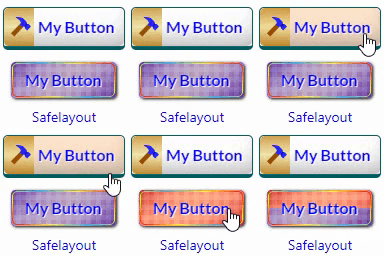
Safelayout Brilliant Buttons – WordPress Buttons
Skip the tedious styling configurations and custom code. Safelayout Brilliant Buttons delivers an instant library of pre-designed, high-converting Call to Action (CTA) buttons and layout sections that drop straight into your content with a single click. Using our dedicated “Insert Button from Library” feature, you can browse, preview, and deploy stunning design buttons instantly. Whether you use Gutenberg (Block Editor), Elementor, or the Classic Editor, this lightweight companion brings effortless aesthetic upgrades to your website. There is no manual layout building required—simply pick a ready-made option from the library featuring multi-color gradient fills, background patterns, or elegant text subheadings. 📦 Ready-Made Call to Action Patterns & Blocks Want more than just a single button? Access pre-configured layout blocks designed to capture leads instantly: * High-Converting Sections: Instant boxes complete with bold marketing headers (e.g., “Get 40% Off Across All Categories” or “Ready to Bring Your Ideas to Life?”) with beautiful buttons like “Visit Shop” and “Shop Deals”. * Native Integration: Insert these ready-made patterns directly from your Gutenberg block panel or Elementor widget dashboard with zero building required. ⏳ Effortless “After Click” States (Zero Frustration) Standard WordPress buttons leave users wondering if a page has frozen after a click. Safelayout Brilliant Buttons fixes this user experience gap instantly with automated after-click loading features. With no complex setup, your buttons can automatically display: * Live Processing Statuses: Watch the button label immediately update to helpful feedback like “Please wait…” or “Redirecting…”. * An Inline Loading Spinner: A smooth, integrated visual animation shows users the site is actively working. This unique feature eliminates duplicate form submissions and keeps traffic calm on slower web servers. ⚡ Instant “Click Effects” & Fluid Hover Transitions Give your website visitors immediate, tactile satisfaction. The plugin includes pre-configured click animation profiles and fluid micro-interactions. Your buttons respond the exact millisecond they are pressed with interactive ripple waves, tactile micro-depressions, and energetic layout pulses. 🚀 Optimized for Core Web Vitals (No Font Files) Protecting your website page speed is our highest priority. Unlike alternative visual blocks that drag down loading times by fetching heavy external icon toolkits, this plugin displays iconography using 100% pure inline HTML SVG icons. Your pages load lightning-fast, keeping your Core Web Vitals clean across modern desktop and mobile browsers. 🎨 Native Theme & Full-Site Editing (FSE) Compatibility Every pre-set styling choice plays perfectly with responsive modern layouts. Enjoy absolute cross-browser rendering reliability and native Full-Site Editing (FSE) support that seamlessly syncs with your theme’s global font sets and wrapper container environments. Features High quality buttons. Available in Block editor, Classic editor and Elementor. Many beautiful button effects. Many beautiful Hover animation effects. Includes buttons with various background patterns. Includes buttons with various click effects. Ability to show loading animation and change text after click. Include icon button. Include Sub text. Include multi color icon packs. No icon fonts, just inline SVG. Gradient color for icon fill and stroke as well as background color. Fully compatible with Full-Site Editing. Cross browser compatible. Fully customizable. Work with Any Theme. Live Demo Safelayout Brilliant Buttons Demo. Pro Version Safelayout Brilliant Buttons Pro is available. Upgrade to pro version and get full features! Safelayout other plugins Safelayout Elegant Icons – WordPress icon block Safelayout Cute Preloader – CSS3 WordPress Preloader Safelayout Animated Header Footer