Quick Drafts Access is the #98 ranked menu app on WordPress, with a 5.0 average rating from 7 reviews, as of Aug 31, 2026.
Quick Drafts Access is a WordPress Plugin Directory app by Scott Reilly. With a rating of 5.0★ from 7 reviews, it currently ranks #98 in the Menu category.
AppRanks data: Quick Drafts Access ranks #98 in Menu on WordPress Plugin Directory, placing it in the top 20% of that category.
AppRanks verdict
Generated from live marketplace data — refreshed daily
Quick Drafts Access is a category-leading WordPress app with a limited review volume. It is listed in the Menu category on WordPress Plugin Directory, which AppRanks treats as the canonical taxonomy node for ranking and competitor comparison. 7 reviews put it in the early-traction tier — useful for early-stage stores willing to be on the leading edge. Early-traction review counts are sensitive to single launch periods or feature events, so a 30-day re-check before bigger commitments often resolves whether the trend is sustained. Paid-only pricing means evaluating fit on the marketplace listing or via the developer's documentation before installing. AppRanks tracks rating, review count, pricing tier, and category position daily — the figures on this page reflect the most recent scrape from the canonical WordPress Plugin Directory listing.
Pros
- +High average rating (5.0★) signals consistent merchant satisfaction
- +Published by Scott Reilly — established developer track record
Cons
- −Limited review base (7) — ratings can shift significantly with new feedback
Looking to switch from Quick Drafts Access?
See Quick Drafts Access's alternatives ranked by audit score, rating, and review velocity.
How Quick Drafts Access works
Show full descriptionShow less
By default in WordPress, accessing the drafts listing of any given post type (including posts and pages) in the admin requires multiple clicks. Then filtering the drafts listing by a particular user (generally to view only your drafts) additionally requires some non-obvious manual URL hacking.
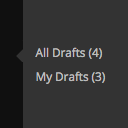
This plugin allows you one click access to all drafts, as well as to just your drafts, of each post type via the main admin menu.
In addition, the plugin provides a count of the number of current drafts for that post type in the link (i.e. the link could read “All Drafts (3)” to indicate there are three drafts for that post type, and “My Drafts (1)” to indicate you only have one draft for that post type).
When the user is responsible for all of the drafts of a given post type (and the “My Drafts” link is not disabled via a hook) then only the “My Drafts” links will appear. It would be redundant to show both the “All Drafts” and “My Drafts” links in this situation. This behavior also ensures only one link is present for single-author blogs.
Also, the draft link(s) only appear for users who have the capability to edit posts of that post type.
The plugin hides the two types of draft links when no related drafts for that post type are present. See the Filters section for how to override this behavior. Filters are also provided to disable the plugin from ever showing the “All Drafts” or the “My Drafts” links.
On admin listings of only draft posts, this plugin also adds a dropdown above the table that allows for the listing to be filtered by the selected draft author. (Only users who actually have a draft post are included in the dropdown.)
Links: Plugin Homepage | Plugin Directory Page | GitHub | Author Homepage
Developer Documentation Developer documentation can be found in DEVELOPER-DOCS.md. That documentation covers the numerous hooks provided by the plugin. Those hooks are listed below to provide an overview of what’s available.
c2c_quick_drafts_access_post_types : Customize the list of post_types for which the draft links will be shown
c2c_quick_drafts_access_show_all_drafts_menu_link : Customize whether the ‘All Drafts’ link will appear at all for a post type.
c2c_quick_drafts_access_show_my_drafts_menu_link : Customize whether the ‘My Drafts’ link will appear at all for a post type.
c2c_quick_drafts_access_show_if_empty : Customize whether the ‘All Drafts’ and/or ‘My Drafts’ links will appear for a post type when that post type currently has no drafts.
c2c_quick_drafts_access_disable_filter_dropdown : removal of the ‘Drafts By’ dropdown from drafts post list table.
Category rankings
As of Sep 4, 2026- Menu#98of 505Top 20%
See 90-day rank history for each category
Track daily rank changes, category shifts, and position volatility.
Competitors & alternatives
Quick Drafts Access doesn't have curated competitor matchups yet. Other tracked menu apps on WordPress:
Where Quick Drafts Access stands in the Menu category
Quick Drafts Access ranks #98 of 505 apps in the Menu category, placing it in the top 20% of the listing.
Frequently asked questions
What is Quick Drafts Access?
Quick Drafts Access is an app for WordPress. It currently holds a 5.0-star rating from 7 merchant reviews, and AppRanks has been tracking its public marketplace data on the refresh cadence published in our methodology. It is listed under the Menu category on AppRanks, where you can see its current category position, review-velocity trend, and how it compares against the top alternatives in the same space. Developed by Scott Reilly.
Who uses Quick Drafts Access?
Currently around 400 active stores have installed Quick Drafts Access. Its review base is still building, which usually maps to early-stage merchants and stores piloting a new workflow. It is part of the Menu category on WordPress.
Where does Quick Drafts Access rank on WordPress?
Quick Drafts Access currently sits at position #98 in the Menu category on WordPress. That places it in the top 19% of 505 apps tracked in the same category. Category positions are read from the live marketplace ranking and refresh on each scrape, so the number you see here reflects the most recent crawl rather than a long-running average.