
Amazon Chime Meetings is the #12 ranked voice & video app on Slack, with a free plan available, as of Sep 11, 2026.
AppRanks data: Amazon Chime Meetings ranks #12 in Voice & Video on Slack Marketplace, placing it in the top 15% of that category.
AppRanks verdict
Generated from live marketplace data — refreshed daily
Amazon Chime Meetings is a newly-listed Slack app with a limited review volume. It is listed in the Voice & Video category on Slack Marketplace, which AppRanks treats as the canonical taxonomy node for ranking and competitor comparison. no published reviews yet means feature claims are unverified by the wider merchant base. Without a published review base, the only fit-signal available is the developer's own documentation plus the marketplace's listing-quality audit (linked below). The free tier lets you trial the entry feature set without committing a payment method. AppRanks tracks rating, review count, pricing tier, and category position daily — the figures on this page reflect the most recent scrape from the canonical Slack Marketplace listing.
Pros
- +Free tier available — no card required to evaluate
Cons
- −No public reviews yet — fit and reliability are unverified
Looking to switch from Amazon Chime Meetings?
See Amazon Chime Meetings's alternatives ranked by audit score, rating, and review velocity.
About Amazon Chime Meetings
How Amazon Chime Meetings works
Show full descriptionShow less
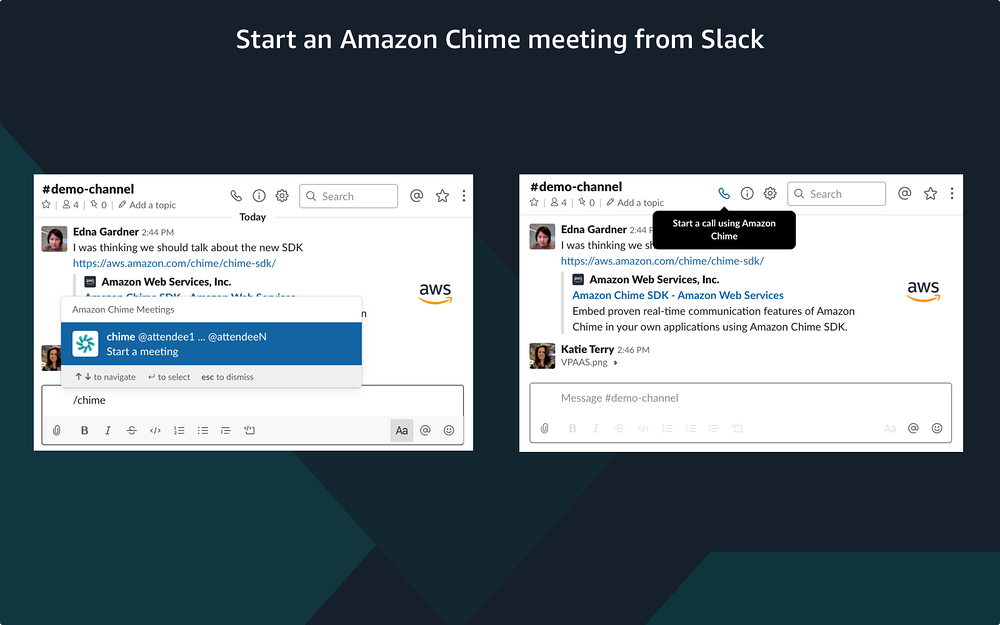
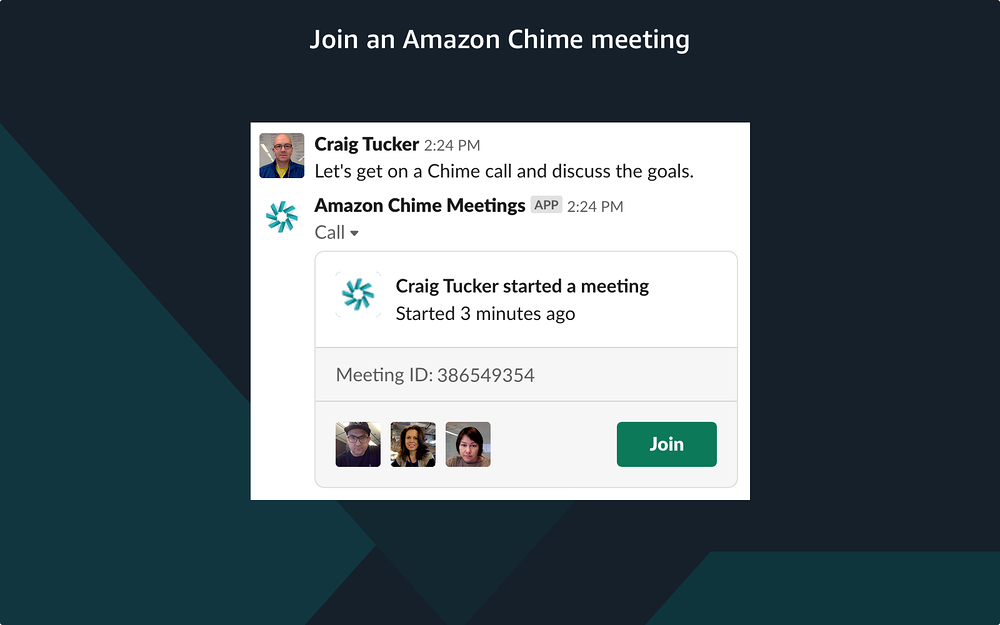
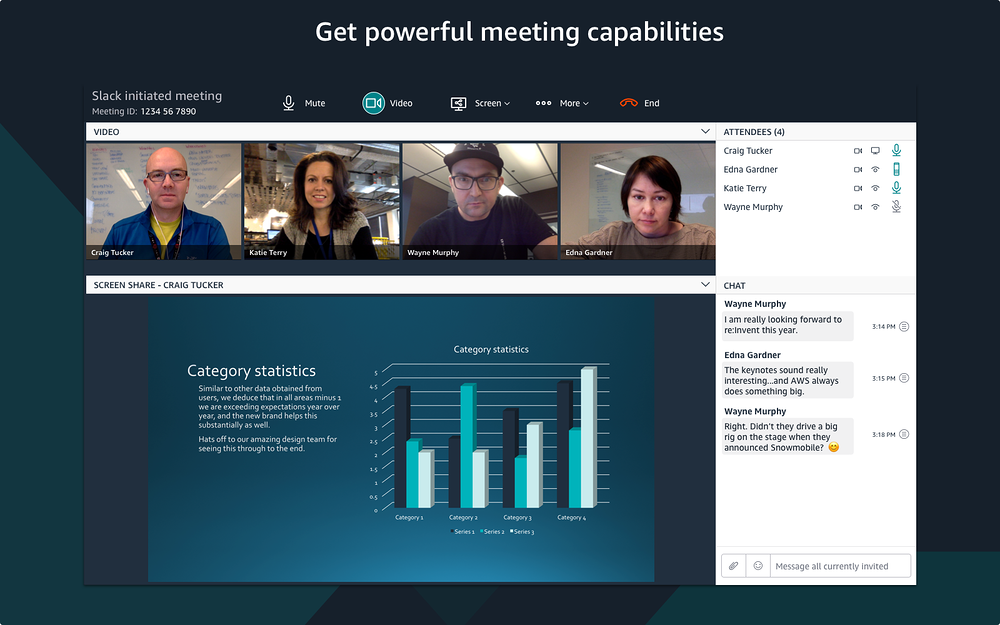
The Amazon Chime Meetings App for Slack is an Enterprise-ready Slack app that lets you start and join Amazon Chime meetings directly from your Slack workspace. Use the /chime slash command or the Slack Call button to start a meeting and your attendees can join with one click from a channel or direct message. You can get access to all the benefits of Amazon Chime meetings including the advanced meeting features of Amazon Chime Pro like group audio and video calling, screen sharing, guest access from a meeting link, conference dial-ins, and support for SIP in-room video systems, all without having to create or manage a new account. Org Owners, Org Admins, and Workspace Administrators can install the Amazon Chime Meetings App from the Slack App Directory and within minutes anyone in the workspace(s) can start using Amazon Chime to place a video call to a Slack contact or host a group meeting. Don’t have an Amazon Chime user profile? Not a problem. You do not have to create a separate profile and can begin using Amazon Chime immediately with your existing Slack profile. You can use the Amazon Chime console to determine Amazon Chime user permissions - Basic permissions enable one-on-one video and screen share, and Pro permissions support up to 250 attendees with dial-in access, up to 16-video tiles, screen sharing and other meeting features. You only pay when Amazon Chime Pro features are used. Visit https://aws.amazon.com/chime/pricing for more details. If you would like to upgrade your users to Amazon Chime Pro, sign into your AWS account or, if you are new to AWS, create an AWS account and sign in. Once you are signed in, click here to create an Amazon Chime Team account and invite the members of your Slack workspace. For more information about the Amazon Chime Meetings App for Slack and setting up Amazon Chime, please refer to our documentation https://docs.aws.amazon.com/chime/latest/ag/config-slack.html. By using Amazon Chime, you agree to the AWS Customer Agreement, AWS Service Terms, and AWS Privacy Notice. If you already have an AWS Customer Agreement, you agree that the terms of that agreement govern your installation and use of this product.
Screenshots
Category rankings
As of Sep 20, 2026- Voice & Video#12of 82Top 15%
- Enterprise-ready apps#23of 35Top 66%
- Communication#108of 601Top 18%
See 90-day rank history for each category
Track daily rank changes, category shifts, and position volatility.
Competitors & alternatives
Amazon Chime Meetings doesn't have curated competitor matchups yet. Other tracked voice & video apps on Slack:


Where Amazon Chime Meetings stands in the Voice & Video category
Amazon Chime Meetings ranks #12 of 82 apps in the Voice & Video category, placing it in the top 15% of the listing.
Frequently asked questions
What is Amazon Chime Meetings?
Amazon Chime Meetings is an app for Slack. It is published on Slack Marketplace and tracked by AppRanks, and AppRanks has been tracking its public marketplace data on the refresh cadence published in our methodology. It is listed under the Voice & Video category on AppRanks, where you can see its current category position, review-velocity trend, and how it compares against the top alternatives in the same space.
Is Amazon Chime Meetings free?
Amazon Chime Meetings does not offer a permanent free plan on Slack. Pricing starts at Free and paid plans available. Trial availability and exact billing terms are mirrored from the live Slack listing and may change between refresh cycles, so always confirm the headline price on the source marketplace before installing.
Who uses Amazon Chime Meetings?
Amazon Chime Meetings is actively installed across Slack stores tracked by AppRanks. Its review base is still building, which usually maps to early-stage merchants and stores piloting a new workflow. It is part of the Voice & Video category on Slack.
Where does Amazon Chime Meetings rank on Slack?
Amazon Chime Meetings currently sits at position #12 in the Voice & Video category on Slack. That places it in the top 15% of 82 apps tracked in the same category. Category positions are read from the live marketplace ranking and refresh on each scrape, so the number you see here reflects the most recent crawl rather than a long-running average.