SlidesPro for Google Workspace Marketplace
By slidespro.io
SlidesPro is the #80 ranked office applications app on Google Workspace, with a 4.6 average rating from 121 reviews, with a free plan available, as of Aug 11, 2026.
SlidesPro is a Google Workspace Marketplace app by slidespro.io. With a rating of 4.6★ from 121 reviews, it currently ranks #80 in the Office applications category.
AppRanks data: SlidesPro ranks #80 in Office applications on Google Workspace Marketplace, placing it in the top 75% of that category.
AppRanks verdict
Generated from live marketplace data — refreshed daily
SlidesPro is a highly rated Google Workspace app with a growing review traction. It is listed in the Office applications category on Google Workspace Marketplace, which AppRanks treats as the canonical taxonomy node for ranking and competitor comparison. 121 reviews put it in the early-traction tier — useful for early-stage stores willing to be on the leading edge. Early-traction review counts are sensitive to single launch periods or feature events, so a 30-day re-check before bigger commitments often resolves whether the trend is sustained. The free tier lets you trial the entry feature set without committing a payment method. AppRanks tracks rating, review count, pricing tier, and category position daily — the figures on this page reflect the most recent scrape from the canonical Google Workspace Marketplace listing.
Pros
- +High average rating (4.6★) signals consistent merchant satisfaction
- +Free tier available — no card required to evaluate
- +Published by slidespro.io — established developer track record
Cons
- −Single-category specialization (business-tools) — useful but limited if you need broad capabilities
Looking to switch from SlidesPro?
See SlidesPro's alternatives ranked by audit score, rating, and review velocity.
About SlidesPro
How SlidesPro works
Show full descriptionShow less
By turbo-charging your Google™ Slides with SlidesPro, you will be able to: Position and order elements across the slides and amongst themselves Resize elements easily so that they have the same size Modify text characteristics, merge or split text boxes easily Change colours of any element or text with a single click Insert beautiful and meaningful images and photos
Wizards We currently offer four wizards: Icons, Images, Charts and Maps but many more are under construction at the moment and will be made available to you as soon as ready. For now though, you will be able to create the following:
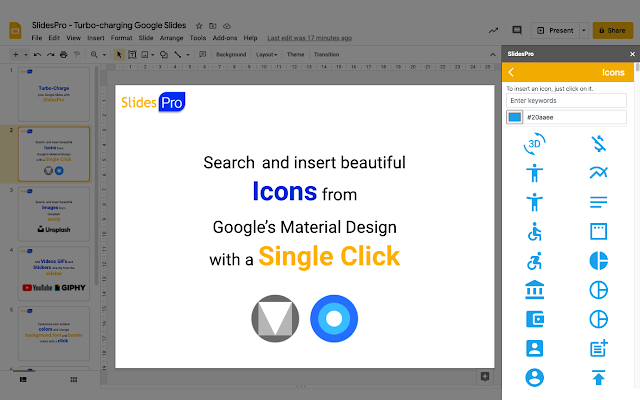
Icons: Search icons within a set of libraries that include Google™'s Material design, change the colour of the icons and insert them into your presentation seamlessly with a single click of a button.
YouTube Videos: Insert videos from YouTube into presentations with a single click.
GIFs: Search GIFs from GIPHY easily and insert them with a click.
Stickers: Search Stickers from GIPHY easily and insert them with a click.
Images: Search the great image and photo library from Unsplash, find beautiful photos and images and insert them directly into your slides.
Position & Order This section of the tools has been designed to give you access to more features to align elements amongst themselves and relative to the overall slide. We have also added shortcuts for you to order elements very easily and also swap objects so that you can easily modify your slides without wasting a minute of your time.
Size The Size section allows you to resize elements easily relative to other ones. You can for example stretch an element to the down most edge of the Master element or expand the height of an object to the Master. Rather than describing it though, you might wanna have a go and play with it, we believe these features are very useful :)
Text We have added this section as a way for you to access the standard text features easily since they tend to be highly used. And to complement it, we have two very cool additions: merge and split text boxes. As its name suggests, merge text boxes will merge multiple text boxes into one and split text boxes will… well, you know :)
Theme Colors In this section, we have created a list of colors for you to change the background, border and font colors of your elements very fast. And the best thing is that now you can also edit them and customise them!
We hope you enjoy SlidesPro and that you find it very useful.
Feel free to reach out should you have any feedback by email at [email protected]
For any questions or issues, please also email us at [email protected]. For more information, please visit: www.slidespro.io
Screenshots



Category rankings
As of Sep 4, 2026- Office applications#80of 107Top 75%
See 90-day rank history for each category
Track daily rank changes, category shifts, and position volatility.
Competitors & alternatives
SlidesPro doesn't have curated competitor matchups yet. Other tracked office applications apps on Google Workspace:




 Compare
Frequently asked questions
What is SlidesPro?
SlidesPro is an app for Google Workspace. It currently holds a 4.6-star rating from 121 merchant reviews, and AppRanks has been tracking its public marketplace data on the refresh cadence published in our methodology. It is listed under the Office applications category on AppRanks, where you can see its current category position, review-velocity trend, and how it compares against the top alternatives in the same space. Developed by slidespro.io.
Where does SlidesPro rank on Google Workspace?
SlidesPro currently sits at position #80 in the Office applications category on Google Workspace. That places it in the top 75% of 107 apps tracked in the same category. Category positions are read from the live marketplace ranking and refresh on each scrape, so the number you see here reflects the most recent crawl rather than a long-running average.