
SignNow esignature for Gmail™ for Google Workspace Marketplace
SignNow esignature for Gmail™ is a Google Workspace app, with a 4.5 average rating from 132 reviews, with a free plan available, as of Aug 11, 2026.
SignNow esignature for Gmail™ is a Google Workspace Marketplace app by airSlate Inc.. With a rating of 4.5★ from 132 reviews.
AppRanks verdict
Generated from live marketplace data — refreshed daily
SignNow esignature for Gmail™ is a well-rated Google Workspace app with a growing review traction. Category data on the canonical marketplace listing is currently incomplete, so AppRanks falls back to platform-wide rather than category-relative comparison for this listing. 132 reviews put it in the early-traction tier — useful for early-stage stores willing to be on the leading edge. Early-traction review counts are sensitive to single launch periods or feature events, so a 30-day re-check before bigger commitments often resolves whether the trend is sustained. The free tier lets you trial the entry feature set without committing a payment method. AppRanks tracks rating, review count, pricing tier, and category position daily — the figures on this page reflect the most recent scrape from the canonical Google Workspace Marketplace listing.
Pros
- +Free tier available — no card required to evaluate
- +Published by airSlate Inc. — established developer track record
Cons
- −Single-category specialization (business-tools) — useful but limited if you need broad capabilities
Looking to switch from SignNow esignature for Gmail™?
See SignNow esignature for Gmail™'s alternatives ranked by audit score, rating, and review velocity.
About SignNow esignature for Gmail™
How SignNow esignature for Gmail™ works
Show full descriptionShow less
SignNow introduces the life-changing eSignature for Gmail™ add-on, a game-changer in the world of electronic signatures. Coming with an easy-to-use interface, this robust tool exceptionally integrates with Gmail™ to facilitate the most effective document signing right within your mailbox. Turn time-consuming tasks into a matter of a few clicks and level up your productivity with our Gmail™ eSignature solution.
Skip printing, manually hand-signing, and scanning of documents by embracing SignNow's award-winning features, a perfect fit for both individuals and businesses. With eSignature for Gmail™ aboard, you are fully equipped to close deals, certify crucial forms, and make your important operations legally binding swiftly and conveniently.
Key features that make our eSignature for Google Gmail™ stand out: ➤ Get a signNow account automatically. ➤ Manage all docs in a protected environment with SOC 2 Type II security standards. ➤ Sign attachments without leaving your mailbox. ➤ Upload the attached files and edit PDFs. ➤ Send out electronic signature requests in a few clicks from Google Gmail™. ➤ Speed up the process of collecting e-signatures. ➤ Get instant notifications about the results. ➤ Simplify your communication with clients and teammates.
*** Want to try SignNow for free? Get your 30-day free trial right now!
Please note that you must register for a free SignNow account to save the edited document. A paid subscription plan is required to use some signNow features.***
Imagine if you could receive a contract by email, immediately fill it out and electronically sign it directly from your inbox or send documents to the responsible person for signature. What could be easier? You don't need to download or install any third-party software for online document signing.
To start using the add-on, open your Google Gmail™ inbox in your web browser and follow the steps given below: - Click the Settings button, located in the top right corner of the screen. - In the drop-down menu, choose Get add-ons. - A new G Suite Marketplace window will open. - Search for signNow using the upper search bar. - Click the add-on preview. Select Install in the new window. - Click the Continue button to confirm your installation. - In the next window, log into signNow using your Google account.
How To Sign Documents From Google Gmail™
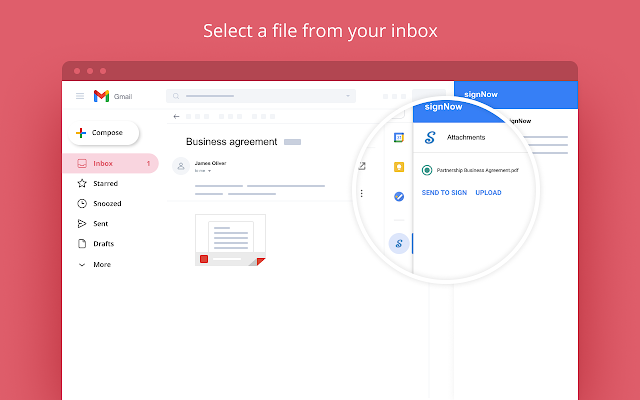
Now the Google Gmail™ document signature app will be available directly in your inbox. It works in the following way: ➤ The add-on will be available in the right sidebar, which contains all tools for Google Gmail™. To see the full list, click the arrow. ➤ Once you’ve opened an email that contains an attachment, click the SignNow button. ➤ Click Send to Sign to forward a signing request to another user. Enter the receiver’s email address and click OK. Every document sent via add-on automatically saves to your SignNow account. ➤ Click Upload to import the attachment to your SignNow account. Specify whether you want to instantly sign an email attachment or return to your Google Gmail™ inbox.
Have questions about SignNow? Contact us by email: [email protected] Want to get support? Visit https://university.signnow.com/ Subscribe to our blog https://blog.signnow.com/ Follow us on Twitter: @signnow Like us on Facebook: https://www.facebook.com/esignaturesignnow/
SignNow is a widely known leader in the e-signing industry. The eSignature for Google Gmail™ extension adds a range of possibilities for paperless document management and helps improve your business performance. Use it to sign documents in Google Gmail™ and share them with your colleagues. Enjoy the benefits of secure document processing today and forget about ever having to exchange paper copies again.
Mark F. “SignNow is affordable yet gives some very advanced features. My favorite feature is where you can create a link for people to access a recurring form to fill out. This is very helpful when selling insurance over the internet. People come to my website and buy insurance without me involved.”
Ashley M. “It makes getting signatures from customers easy by letting me upload documents and add form fields for them to fill out/sign. I can then electronically send the forms to be completed.”
Steph Jacob “I had a document for my non-profit that 4 members in 4 different states had to fill out with our info and signatures. We couldn't figure out the logistics until I stumbled upon this app. It took me 3 seconds to upload my blank document and learn how to add the info. I did it all on my phone, and it was sooooo easy!!”
Screenshots




Competitors & alternatives
AppRanks tracks competitor sets per category. For SignNow esignature for Gmail™, the independent listing audit includes a competitive context section, and the full Google Workspace app index shows the broader marketplace landscape this app competes in. Sign up free to surface a side-by-side competitor matrix customized to your tracked apps.
Frequently asked questions
What is SignNow esignature for Gmail™?
SignNow esignature for Gmail™ is an app for Google Workspace. It currently holds a 4.5-star rating from 132 merchant reviews, and AppRanks has been tracking its public marketplace data on the refresh cadence published in our methodology. AppRanks tracks its category position, review-velocity trend, and the top alternatives in the same space. Developed by airSlate Inc.