Send Email Notification & Poll Flow for Google Workspace
- Category rank
- #75 in Task management
- Listing audit
- 65/100
Send Email Notification & Poll Flow is a Google Workspace Marketplace app by Sheet Automation. With a rating of 4.8★ from 55 reviews, it currently ranks #75 in the Task management category.
Send Email Notification & Poll Flow is the #75 ranked Task management app on Google Workspace, with a 4.8 average rating from 55 reviews, as of Aug 11, 2026.
AppRanks verdict
Generated from marketplace data as of Aug 11, 2026
Send Email Notification & Poll Flow ranks #75 of 109 in Task management on Google Workspace. It holds a 4.8★ average from 55 reviews on Google Workspace.
Pros
- +4.8★ average across 55 reviews
Cons
- −Only 55 reviews — the average can still move with a few new ratings
About Send Email Notification & Poll Flow
How Send Email Notification & Poll Flow works
Show full descriptionShow less
Whether you're sending status updates, collecting votes on proposals, polling availability, gathering quick yes/no decisions, or notifying customers about order updates, this add-on lets you orchestrate everything from a single sheet. Define recipients, compose your message, send notifications in bulk, and poll responses flow back into your sheet automatically.
####COMMON USECASES#### ✅ HR: Poll team availability, collect PTO confirmations, send onboarding reminders. ✅ Operations: Notify vendors of order status, poll suppliers on delivery dates. ✅ Sales & CS: Send follow-up emails, gather customer satisfaction quick polls. ✅ Project management: Notify stakeholders of milestones, poll teams for go/no-go decisions. ✅ Events: Send invites, collect RSVPs, poll attendees on session preferences. ✅ Internal comms: Run quick team polls, broadcast announcements, collect feedback.
####KEY FEATURES####
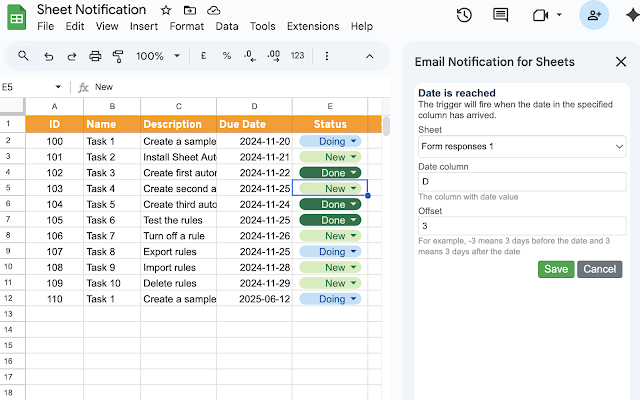
✅ Send personalized emails to recipients listed in your sheet, using row data as merge fields (name, amount, date, custom fields) to mail. ✅ Trigger notifications on demand or automatically when a row meets a condition (status change, new entry, threshold crossed). ✅ Use rich HTML templates or plain text, with subject lines and body content driven by your spreadsheet. ✅ Schedule sends when due date has arrived ✅ Send poll questions to recipients with one-click response buttons (Yes/No, Approve/Reject, multiple choice, or custom options). ✅ Responses are captured back into your sheet automatically. ✅ Run single-question polls or multi-step poll flows where the next question depends on the previous answer.
####WORKS WITH SHEET AUTOMATION#### Already using Sheet Automation? Flow is designed to complement it. Use Sheet Automation for instant triggers and actions (send an email, update a cell, call a webhook). Use Flow when you need processes that span multiple steps, multiple people, and multiple days.