
Mazetec for Google Slides™ for Google Workspace Marketplace
By Mazetec
Mazetec for Google Slides™ is a Google Workspace app, with a 5.0 average rating from 9 reviews, with a free plan available, as of Aug 11, 2026.
Mazetec for Google Slides™ is a Google Workspace Marketplace app by Mazetec. With a rating of 5.0★ from 9 reviews.
AppRanks verdict
Generated from live marketplace data — refreshed daily
Mazetec for Google Slides™ is a category-leading Google Workspace app with a limited review volume. Category data on the canonical marketplace listing is currently incomplete, so AppRanks falls back to platform-wide rather than category-relative comparison for this listing. 9 reviews put it in the early-traction tier — useful for early-stage stores willing to be on the leading edge. Early-traction review counts are sensitive to single launch periods or feature events, so a 30-day re-check before bigger commitments often resolves whether the trend is sustained. The free tier lets you trial the entry feature set without committing a payment method. AppRanks tracks rating, review count, pricing tier, and category position daily — the figures on this page reflect the most recent scrape from the canonical Google Workspace Marketplace listing.
Pros
- +High average rating (5.0★) signals consistent merchant satisfaction
- +Free tier available — no card required to evaluate
- +Published by Mazetec — established developer track record
Cons
- −Limited review base (9) — ratings can shift significantly with new feedback
Looking to switch from Mazetec for Google Slides™?
See Mazetec for Google Slides™'s alternatives ranked by audit score, rating, and review velocity.
About Mazetec for Google Slides™
How Mazetec for Google Slides™ works
Show full descriptionShow less
Turn your Slides into an interactive branching presentation with Mazetec. * Add choices to your slides that your audience navigates from their phone. * Add a timer and points to show the cost and impact of decisions. * Play it live with a group or send out solo.
Originally built for training on how to respond to a mental health crisis, Mazetec captures the attention of busy multitasking students on the go and in the classroom and focuses them on your content.
Choices force people to stop and think about your content, add choices to your slides with Mazetec.
Play with a class or a group. Students join your presentation from their device. You see their choices live, who is on tab, and who hasn't responded. As you (the presenter) move forward all of the student screens are synchronized with your choice.
Create solo / asynchronous activities that students play on their own with a link.
Try the Open Choice feature to capture your class's questions on each slide. Their questions create branches in the presentation that you can respond to and students can review asynchronous later with a link. Learn more https://www.mazetec.org/hybrid-teaching/
Setup instructions: https://www.mazetec.org/article/google-slides-mazetec/
Features - Turn any presentation into a role play, game, quiz, or simulations with branching, points, time, and more. - Empower and engage with interactive branching, open ended choices, polling, forms, gamified activities and more! Create interactive questions that lead to other slides or forms. - Collaborate with colleagues on branching, content, choices, and more - Game mechanics to prompt pressure or strategy - Use it live with a group or individual activity/ exam - Works with Zoom, Teams, Articulate Storyline, Articulate Rise, and other integrations
So many easy-to-use features for a dynamic experience your learners will love!
- Add interactive branching choices to your slides and connect choices to consequences or slides - Add points and time rewards or penalties, limit the time, limit their points - Create a race against the clock by limiting the time. - Subtract more time for bad decisions - Add time for good decisions - Starting the learner with $100 and subtract $10 for each wrong decision and add $10 for each right decision. Link decisions to other slides or consequence nodes with choices. The user will restart if they fail before they pass. - Pipe choices forward - Create surveys and opened questions
* Used by Top Universities! Engaged Learners! Amazing Feedback! * - Teach and test simultaneously by challenging learners to use what they know to navigate simulations you design. - Mobile ready and engineered for low bandwidth.
*How does Mazetec integrate with Google Slides™?* 1. Bring your slides into Mazetec with the Google Slides™ plugin. 2. Enhance your presentation with branching choices and your own point system in just a few clicks! 3. Present or share with a link! And review your data!
*ENGAGE YOUR LEARNERS WITH SO MANY AMAZING FEATURES!* - Branch slides o Create "right" and "wrong" decision paths for a dynamic real-world. o Pipe choices forward to the next slide for a customised experience o Crowd source choices - Consequences - Link to pitfalls, hints, and warnings. - Gamify - Define time and decision point values. o Build up pressures that can make real-life decisions more difficult - in just a few clicks. - Collaborate - invite and build with colleagues. - Surveys - Capture feedback with Surveys. - Analytics - see all the data and the user’s experience
* Branching * - Build branching presentations with interactive questions and choices o Add choices to your slide o Assign points to choices o Crowdsource choices from users o Add crowdsourced choices right in the slide o Pipe answers forward o so much more!
* Gamification * - Gamify with points and time o Simulate real-world pressures. o Show the impact of why decisions matter. o Adding points or time penalties or bonuses. o Create your own points or credit system o Assign penalties and bonuses to choices!
* Access Control * - Advanced link and access controls! o Play live with a group 1. See live data 2. Download attendance list and scores o Create asynchronously links too 1. Limit access with passwords, dates, and more!
* Analytics * - Tons of data! o Create custom reports to visually compare and categorise how people react under pressure in different scenarios and see people improve their decisions across multiple attempts. o Discover the choices that move people forward. o Lots of analytics are available o See when and where users leave the tab o See every choice made by your users o Crowd source choices with open-choices o Visually compare performance under pressure o See people improve decisions over time o Customise your analytics dashboard o Create custom visualisations o Review survey results
* PRESENT & ENGAGE YOUR CLASS LIVE OR ASYNC WITH A LINK *
When you’re ready, be sure to click “Present” in Mazetec. Students will join your Mazetec Session from any device in a web browser. Simply direct your students to your presentation link and enter their code. As you advance your slides, students will automatically sync with your screen, on each slide students will be prompted to answer your questions and their answers will appear on your instructor dashboard in real time!
- Show anonymous responses on the screen - Give students a safe way to practice decisions and discuss the outcomes - Students respond to questions from their own devices in class or remotely - Async with a link for self-paced in class or at home. - Capture name and email or let students play anonymously
For more information about Mazetec, visit www.mazetec.org
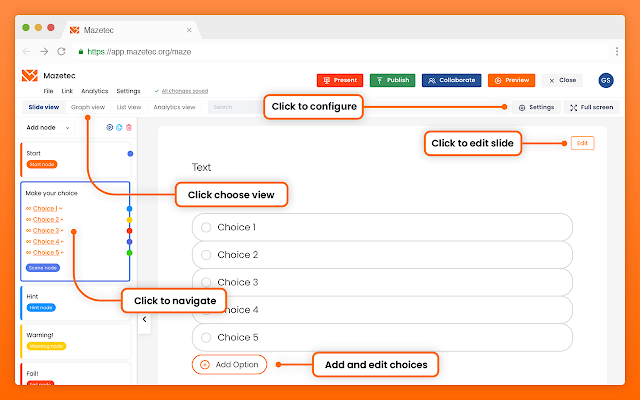
Screenshots




Keyword rankings
Mazetec for Google Slides™ ranks for 1 keywords across Google Workspace Marketplace. Here are the top 1:
- 1.chatbotRank #32
Competitors & alternatives
AppRanks tracks competitor sets per category. For Mazetec for Google Slides™, the independent listing audit includes a competitive context section, and the full Google Workspace app index shows the broader marketplace landscape this app competes in. Sign up free to surface a side-by-side competitor matrix customized to your tracked apps.
Frequently asked questions
What is Mazetec for Google Slides™?
Mazetec for Google Slides™ is an app for Google Workspace. It currently holds a 5.0-star rating from 9 merchant reviews, and AppRanks has been tracking its public marketplace data on the refresh cadence published in our methodology. AppRanks tracks its category position, review-velocity trend, and the top alternatives in the same space. Developed by Mazetec.
Is Mazetec for Google Slides™ free?
Mazetec for Google Slides™ does not offer a permanent free plan on Google Workspace. Pricing starts at Free of charge with paid features. Trial availability and exact billing terms are mirrored from the live Google Workspace listing and may change between refresh cycles, so always confirm the headline price on the source marketplace before installing.