
Clean Inbox for Gmail™ for Google Workspace Marketplace
By Codemoon
Clean Inbox for Gmail™ is a Google Workspace app, with a 4.6 average rating from 205 reviews, with a free plan available, as of Aug 11, 2026.
Clean Inbox for Gmail™ is a Google Workspace Marketplace app by Codemoon. With a rating of 4.6★ from 205 reviews.
AppRanks verdict
Generated from live marketplace data — refreshed daily
Clean Inbox for Gmail™ is a highly rated Google Workspace app with a growing review traction. Category data on the canonical marketplace listing is currently incomplete, so AppRanks falls back to platform-wide rather than category-relative comparison for this listing. 205 reviews put it in the early-traction tier — useful for early-stage stores willing to be on the leading edge. Early-traction review counts are sensitive to single launch periods or feature events, so a 30-day re-check before bigger commitments often resolves whether the trend is sustained. The free tier lets you trial the entry feature set without committing a payment method. AppRanks tracks rating, review count, pricing tier, and category position daily — the figures on this page reflect the most recent scrape from the canonical Google Workspace Marketplace listing.
Pros
- +High average rating (4.6★) signals consistent merchant satisfaction
- +Free tier available — no card required to evaluate
- +Published by Codemoon — established developer track record
Cons
- −Narrow integration surface (1 declared) — may not fit shops with multi-vendor stacks
Looking to switch from Clean Inbox for Gmail™?
See Clean Inbox for Gmail™'s alternatives ranked by audit score, rating, and review velocity.
About Clean Inbox for Gmail™
How Clean Inbox for Gmail™ works
Show full descriptionShow less
➤ More details on https://cleaninboxforgmail.com ➤ This add-on was developed by Codemoon.io
For unsubscribing, also see our other tool: Unsubscribe for Gmail™ (unsubscribeforgmail.com). For email aliases, see: Hide my Email for Gmail™ (guardemail.com).
Clean Inbox for Gmail™ stops incoming automated spam and marketing emails from reaching your inbox using Gmail™ filters. It is also available in the Gmail app on iOS & Android.
✅ Free with premium features. 🔒 We can't read your e-mail. ✅ No sign-up required.
Quick tutorial:
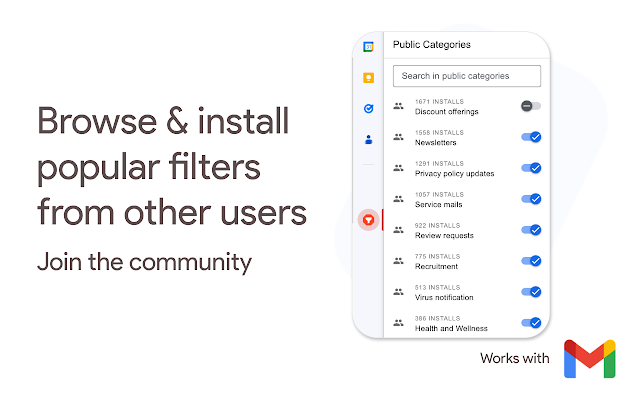
1️⃣ Browse and install public filter categories to label entire incoming categories of annoying emails with just one click. 2️⃣ Create custom filter categories, or let AI do it. 3️⃣ Manage unwanted and allowed senders (blacklist / whitelist).
Our core values: 🔒 Privacy is our top priority. We can't read the contents of your emails. ✅ Your mail is safe! Filtered emails are never deleted, only labeled.
⚫️ Features
🚫 Browse and install public categories (filters) to label entire incoming categories of annoying emails with just one click. 📢 Publish your categories so others can use it too. 📫 Create custom filter categories based on the subject of the email that you have opened, using chatGPT, with language detection. 📫 Create custom filter categories, using chatGPT, by inserting a category, such as 'software sales', or 'review request reminder'. ➕ Bulk insert senders to your unwanted or allowed list. 🚫 1 click to filter all emails from a domain or user. No need to unsubscribe anymore! ✅ 1 click to always allow certain senders or domains in your inbox. ❕ Report annoying emails to Clean Inbox for Gmail™, so we can evolve our filters.
⚫️ Why use Clean Inbox for Gmail™?
Inboxes tend to get flooded with automated mail: newsletter emails, privacy policy updates, requests to review, promotions, forum updates or service announcements, and many more.
Inbox rules / filters can be created to manage these emails. But creating good filters that do exactly what you want (filter the annoying emails and make sure you don't miss the important emails) can be difficult and time-consuming. They can also become outdated after a while.
Clean Inbox for Gmail™ automates this for a large part. It works by creating filters that use lists of phrases that typically occur in categories that you enable. You can also automatically create such lists yourself with our AI powered filter generator.
A note about false positives: when reading this, many people think that there may be too many false positives if it 'only' works using phrases. You may be surprised to find out how well it actually works in practice. This is because the (combination of) words that are chosen in the categories are highly specific to certain types of emails. However, if you still find that the add on has labeled an email from an important sender, you can always add this sender to the whitelist.
Give it a try! As a developer of this add on, I use it personally too and it just completely solved this annoying problem of automated marketing email I had for years.
Other add ons also require access to read, send and delete all the mails in your inbox.
We don't need this. We can only temporarily see the title and the sender of the email that you have opened, while you have the add on opened.
Use Clean Inbox for Gmail™ to manage your filters.
⚫️ Privacy
We take the privacy of our users very seriously, and we have implemented various safeguards to ensure that your data remains confidential. We do not have access to your inbox, and the data we have access to is limited to your email address, labels, and basic settings. Our security measures include encryption of data at rest and field level encryption for sensitive data, and we have a strict policy against sharing any user data with third parties.
Additionally, the information we require to function properly is limited to the title and sender of the email that you have opened, your labels, your basic settings, and your email address which is only used to save your settings. We cannot enable forward email addresses through our add-on.
In case you open an email and then create a filter based on it, it only accesses the title of the email that you have opened. Make sure you don't have privacy sensitive information in the title of the email, such as your name or email address.
⚫️ About Clean Inbox for Gmail™ is an essential Gmail add-on that will help you achieve Inbox Zero and boost your productivity. With its powerful filtering capabilities, you can now easily manage your mailbox and clean up your inbox from unwanted and spam emails, marketing and promotional content, and junk messages. Clean Inbox for Gmail™ works with public community curated categories and custom filter categories that are powered by chatGPT. The tool is easy to use and allows you to apply labels, block unwanted senders, and manage domains and addresses with ease. The add-on is a toolbox that helps you keep your mailbox organized and clutter-free, enabling you to focus on the emails that matter most.
⚫️ More
It can also be useful against phishing, because it can be used to block emails that contain certain keywords. Also, malicious domains that are reported by other users can be blocked entirely.
⚫️ Support
FAQ: https://cleaninboxforgmail.com/support Website: https://cleaninboxforgmail.com Contact us: [email protected]
Screenshots



Competitors & alternatives
AppRanks tracks competitor sets per category. For Clean Inbox for Gmail™, the independent listing audit includes a competitive context section, and the full Google Workspace app index shows the broader marketplace landscape this app competes in. Sign up free to surface a side-by-side competitor matrix customized to your tracked apps.
Frequently asked questions
What is Clean Inbox for Gmail™?
Clean Inbox for Gmail™ is an app for Google Workspace. It currently holds a 4.6-star rating from 205 merchant reviews, and AppRanks has been tracking its public marketplace data on the refresh cadence published in our methodology. AppRanks tracks its category position, review-velocity trend, and the top alternatives in the same space. Developed by Codemoon.
Is Clean Inbox for Gmail™ free?
Clean Inbox for Gmail™ does not offer a permanent free plan on Google Workspace. Pricing starts at Free of charge with paid features. Trial availability and exact billing terms are mirrored from the live Google Workspace listing and may change between refresh cycles, so always confirm the headline price on the source marketplace before installing.